
How to Convert Map/Array List to JSON String in Flutter
Verified Solution
Tested on Flutter 3.47.7 • Dart 3.13.5
Jump to Updated Flutter Example ↓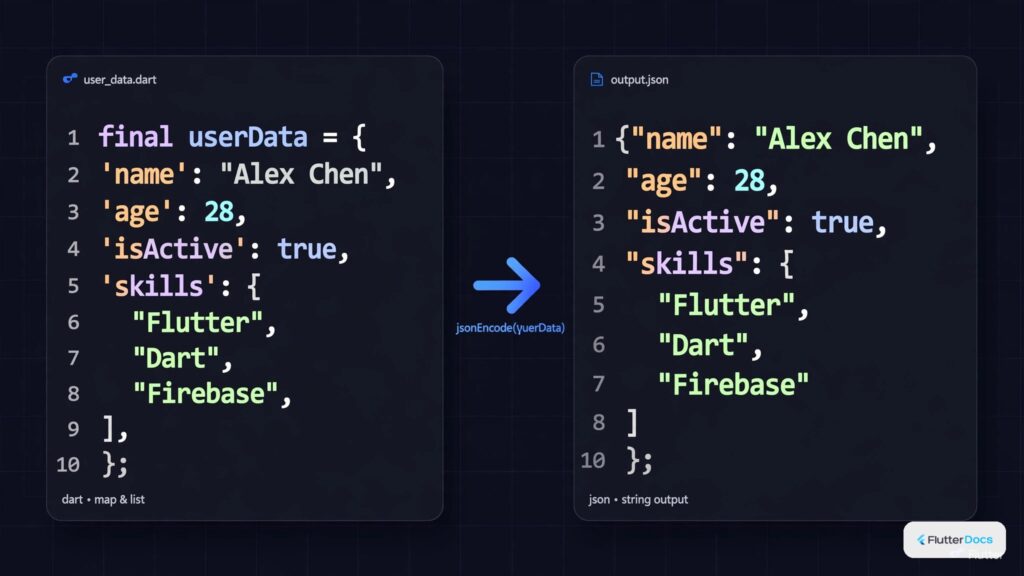
In this post, we are going to show you how to convert a Map, Simple Array List, or List of Objects to JSON string in Flutter and Dart. You may need to convert the array list or map to JSON string to save as a string or send to the server as a string on your app.
Import dart:convert:
import 'dart:convert';You need this library for JSON functions.
How to Convert Map to JSON String:
var ages = {"John":26, "Krishna": 34, "Rahul":67, "Maichel": 33};
String jsonstringmap = json.encode(ages);
print(jsonstringmap);
//output: {"John":26,"Krishna":34,"Rahul":67,"Maichel":33}
How to Convert Array to JSON String:
List<String> names = ["John", "Krisna", "Rahul", "Maichel"];
String jsonstring = json.encode(names);
print(jsonstring);
//output: ["John","Krisna","Rahul","Maichel"]
Convert Array List of Modal Objects to JSON String:
class Student{
   String rollno, name, age;
   List<int> marks;

   Student({
     required this.rollno,
     required this.name,
     required this.age,
     required this.marks
   });
}
List<Student> students = [
Student(name: "John", rollno: "12", age: "26", marks: [23, 45, 35]),
Student(name: "Krishna", rollno: "12", age: "26", marks: [23, 45, 35]),
Student(name: "Rahul", rollno: "12", age: "26", marks: [23, 45, 35])
];
var studentsmap = students.map((e){
return {
"name": e.name,
"rollno": e.rollno,
"age": e.age,
"marks": e.marks
};
}).toList(); //convert to map
String stringstudents = json.encode(studentsmap);
print(stringstudents);The output of this code:
/*--- output ----
[{
  "name": "John",
  "rollno": "12",
  "age": "26",
  "marks": [23, 45, 35]
}, {
  "name": "Krishna",
  "rollno": "12",
  "age": "26",
  "marks": [23, 45, 35]
}, {
  "name": "Rahul",
  "rollno": "12",
  "age": "26",
  "marks": [23, 45, 35]
}]

*/
Alternatively,
class Student{
   String rollno, name, age;
   List<int> marks;

   Student({
     required this.rollno,
     required this.name,
     required this.age,
     required this.marks
   });

   Map<String, dynamic> toMap() {
    return {
      'name': this.name,
      'rollno': this.rollno,
      'age': this.age,
      'marks': this.marks,
    };
  }

  static dynamic getListMap(List<dynamic> items) {
    if (items == null) {
      return null;
    }
    List<Map<String, dynamic>> list = [];
    items.forEach((element) {
      list.add(element.toMap());
    });
    return list;
  }
}
List<Student> students = [
Student(name: "John", rollno: "12", age: "26", marks: [23, 45, 35]),
Student(name: "Krishna", rollno: "12", age: "26", marks: [23, 45, 35]),
Student(name: "Rahul", rollno: "12", age: "26", marks: [23, 45, 35])
];
var studentsmap1 = Student.getListMap(students);
//convert to map
String stringstudents1 = json.encode(studentsmap);
print(stringstudents1);Same as output above.
In this way, you can covert Array List, Array List of Objects, Map to JSON string in Flutter and Dart For sending or receiving complex payloads with backend services, review our guide on generating structured JSON data and array list basics in Dart.
Updated Flutter Example
Updated Flutter Example
Type-Safe JSON Serialization & Entity Models
Key Implementation Details & Modern Differences:
- Strongly-Typed Domain Modeling: Implements typed model classes with
fromJson()andtoJson()factories rather than manipulating raw untyped dictionaries. - Null-Safe Type Casting: Safely handles missing or malformed JSON fields using explicit null-coalescing defaults (
??). - Formatted JSON Output: Employs
JsonEncoder.withIndent(' ')for readable, formatted debug inspection.
Updated Flutter Example Code
import 'dart:convert';
import 'package:flutter/material.dart';

void main() {
  runApp(const MaterialApp(home: ModernJsonSerializationDemo()));
}

class GuideSummary {
  final int id;
  final String title;
  final bool isVerified;
  final List<String> tags;

  const GuideSummary({
    required this.id,
    required this.title,
    required this.isVerified,
    required this.tags,
  });

  factory GuideSummary.fromJson(Map<String, dynamic> json) {
    return GuideSummary(
      id: json['id'] as int? ?? 0,
      title: json['title'] as String? ?? 'Untitled',
      isVerified: json['is_verified'] as bool? ?? false,
      tags: (json['tags'] as List<dynamic>?)
              ?.map((e) => e.toString())
              .toList() ??
          const [],
    );
  }

  Map<String, dynamic> toJson() => {
        'id': id,
        'title': title,
        'is_verified': isVerified,
        'tags': tags,
      };
}

class ModernJsonSerializationDemo extends StatefulWidget {
  const ModernJsonSerializationDemo({super.key});

  @override
  State<ModernJsonSerializationDemo> createState() =>
      _ModernJsonSerializationDemoState();
}

class _ModernJsonSerializationDemoState
    extends State<ModernJsonSerializationDemo> {
  String _encodedJson = '';
  GuideSummary? _decodedSummary;

  final GuideSummary _sample = const GuideSummary(
    id: 85,
    title: 'Modern JSON Serialization in Dart',
    isVerified: true,
    tags: ['dart', 'json', 'serialization'],
  );

  @override
  void initState() {
    super.initState();
    _serializeAndDeserialize();
  }

  void _serializeAndDeserialize() {
    final raw = const JsonEncoder.withIndent('  ').convert(_sample.toJson());
    final Map<String, dynamic> parsedMap =
        jsonDecode(raw) as Map<String, dynamic>;
    setState(() {
      _encodedJson = raw;
      _decodedSummary = GuideSummary.fromJson(parsedMap);
    });
  }

  @override
  Widget build(BuildContext context) {
    final theme = Theme.of(context);

    return Scaffold(
      appBar: AppBar(
        title: const Text('Type-Safe JSON Serialization'),
      ),
      body: Padding(
        padding: const EdgeInsets.all(16.0),
        child: Column(
          crossAxisAlignment: CrossAxisAlignment.stretch,
          children: [
            Text('Generated JSON Payload:', style: theme.textTheme.titleMedium),
            const SizedBox(height: 8),
            Container(
              padding: const EdgeInsets.all(12),
              decoration: BoxDecoration(
                color: theme.colorScheme.surfaceContainerHighest,
                borderRadius: BorderRadius.circular(8),
              ),
              child: Text(
                _encodedJson,
                style: const TextStyle(fontFamily: 'monospace', fontSize: 13),
              ),
            ),
            const SizedBox(height: 16),
            if (_decodedSummary != null) ...[
              Text('Deserialized Model Entity:',
                  style: theme.textTheme.titleMedium),
              const SizedBox(height: 8),
              Card.outlined(
                child: ListTile(
                  leading: const Icon(Icons.data_object),
                  title: Text(_decodedSummary!.title),
                  subtitle: Text('ID: ${_decodedSummary!.id} • Tags: ${_decodedSummary!.tags.join(", ")}'),
                  trailing: Icon(
                    _decodedSummary!.isVerified
                        ? Icons.check_circle
                        : Icons.error_outline,
                    color: Colors.green,
                  ),
                ),
              ),
            ],
          ],
        ),
      ),
    );
  }
}
Document History & Archival Record
Original reference snapshot archived April 1, 2023. Updated working solution verified on modern Flutter & Dart SDKs.