
How to Split String to List Array in Dart/Flutter
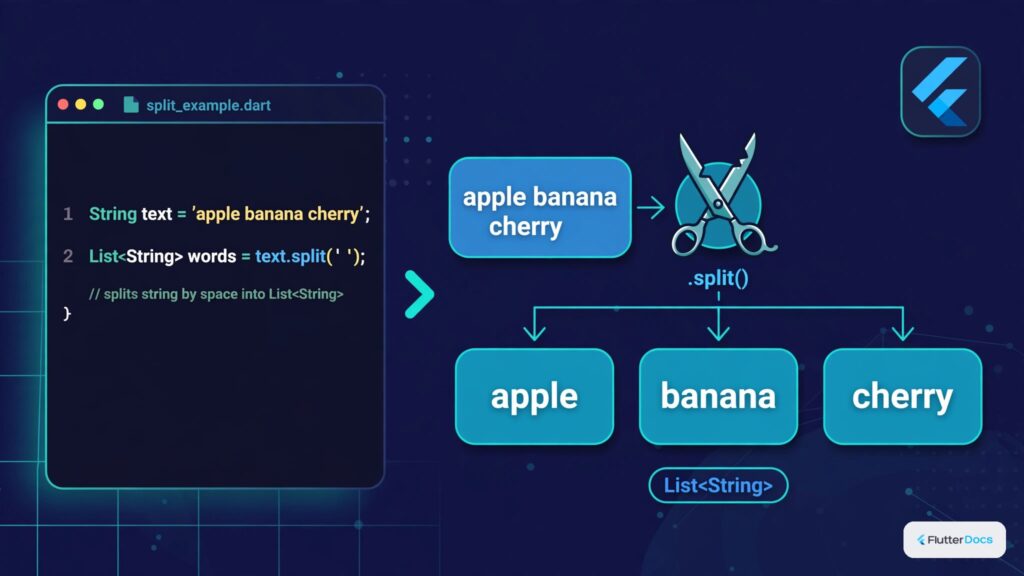
In this example, we are going to show you how to split strings into list arrays using delimiters such as space, comma in Dart, or Flutter. Here, we will break or convert a string to an array using whitespace and comma. See the example below:
How to Split String to List Array in Dart/Flutter?
String str = "Hello This is FlutterCampus";
List<String> strarray = str.split(" ");
//Break string to array with delimiter whitespace "";
print(strarray);
//output: [Hello, This, is, FlutterCampus]
Or, split with a comma:
String countries = "Nepal, India, USA, Russia, UK, China, Canada";
List<String> clist = countries.split(",");
print(clist);
//output: [Nepal,  India,  USA,  Russia,  UK,  China,  Canada]
You can use split() method to break String into List Array in Dart or Flutter.
How to Join List Array Items to String?
List<String> slist =  ["hello", "how", "are", "you"];
String mystr = slist.join("");
print(mystr); //output: hellohowareyou

String mystr1 = slist.join(" ");
print(mystr1); //output: hello how are you
You can also join the list of Strings to one String using the above code.
Flutter Code Example:
import 'package:flutter/material.dart';

Future<void> main() async {
  runApp(MyApp());
}

class MyApp extends StatelessWidget{
  @override
  Widget build(BuildContext context) {
    return MaterialApp(
      home: Home(),
    );
  }
}


class Home extends StatefulWidget{
  @override
  _HomeState createState() => _HomeState();
}

class _HomeState extends State<Home> {

  @override
  Widget build(BuildContext context) {

    String str = "Hello This is FlutterCampus";
    List<String> strarray = str.split(" ");
    //Break string to array with delimiter whitespace "";

    return  Scaffold(
          appBar: AppBar(
              title: Text("Split String to Array"),
              backgroundColor: Colors.redAccent,
          ),
          body: Container(
            padding: EdgeInsets.all(30),
            child: Column(
              children:strarray.map((word){
                  return Card(
                    child:ListTile(
                        title: Text(word),
                    )
                  );
              }).toList()
            )
          ),
       );
  }
}
Here, we have a string, and it is split into a List array. After breaking the array, we have populated to Column() widget to make it look like a ListView.
Output Screenshot:

In this way, you can split String to List array or convert List Array of Strings to one String in Dart or Flutter. To work with the resulting token lists, review array list basics in Dart and filtering list arrays.
Updated Flutter Example
String Splitting & Delimiter Tokenization
Key Implementation Details & Modern Differences:
- Pattern & Regex Splitting: Utilizes standard Dart
String.split()with flexiblePatterndelimiters rather than manual loop indexing. - Token Trimming & Normalization: Automatically filters redundant whitespace and empty entries to prevent empty string artifacts.
- Material 3 Interactive Chip Preview: Displays parsed array items as responsive, numbered tag chips.
import 'package:flutter/material.dart';

void main() {
  runApp(const MaterialApp(home: ModernStringSplitterDemo()));
}

/// Production utility for pattern-based string splitting and tokenization in Dart 3.
class StringSplitterService {
  /// Splits [input] by [delimiter], optionally trimming tokens and filtering empty strings.
  static List<String> split(
    String input,
    Pattern delimiter, {
    bool trimTokens = true,
    bool filterEmpty = true,
  }) {
    if (input.isEmpty) return const [];

    Iterable<String> tokens = input.split(delimiter);

    if (trimTokens) {
      tokens = tokens.map((token) => token.trim());
    }

    if (filterEmpty) {
      tokens = tokens.where((token) => token.isNotEmpty);
    }

    return tokens.toList(growable: false);
  }

  /// Splits multi-line string by standard newline characters (\r\n or \n).
  static List<String> splitLines(String input) {
    return split(input, RegExp(r'\r?\n'));
  }

  /// Splits comma-separated values (CSV) into clean list of items.
  static List<String> splitCsv(String input) {
    return split(input, ',');
  }
}

class ModernStringSplitterDemo extends StatefulWidget {
  const ModernStringSplitterDemo({super.key});

  @override
  State<ModernStringSplitterDemo> createState() =>
      _ModernStringSplitterDemoState();
}

class _ModernStringSplitterDemoState extends State<ModernStringSplitterDemo> {
  final TextEditingController _controller = TextEditingController(
    text: 'Flutter, Dart, Material 3, Widgets, Declarative UI',
  );
  String _selectedDelimiter = ',';

  @override
  void dispose() {
    _controller.dispose();
    super.dispose();
  }

  @override
  Widget build(BuildContext context) {
    final theme = Theme.of(context);
    final tokens = StringSplitterService.split(
      _controller.text,
      _selectedDelimiter,
    );

    return Scaffold(
      appBar: AppBar(title: const Text('String Splitting & Tokenization')),
      body: SingleChildScrollView(
        padding: const EdgeInsets.all(20.0),
        child: Column(
          crossAxisAlignment: CrossAxisAlignment.stretch,
          children: [
            TextField(
              controller: _controller,
              decoration: const InputDecoration(
                labelText: 'Source Text to Split',
                border: OutlineInputBorder(),
              ),
              onChanged: (_) => setState(() {}),
            ),
            const SizedBox(height: 16),
            Text('Delimiter Selection:', style: theme.textTheme.labelMedium),
            const SizedBox(height: 8),
            SegmentedButton<String>(
              segments: const [
                ButtonSegment(value: ',', label: Text('Comma ( , )')),
                ButtonSegment(value: ' ', label: Text('Space ( )')),
                ButtonSegment(value: ';', label: Text('Semicolon ( ; )')),
              ],
              selected: {_selectedDelimiter},
              onSelectionChanged: (val) {
                setState(() => _selectedDelimiter = val.first);
              },
            ),
            const SizedBox(height: 24),
            Text(
              'Extracted Tokens (${tokens.length}):',
              style: theme.textTheme.titleMedium,
            ),
            const SizedBox(height: 12),
            Wrap(
              spacing: 8,
              runSpacing: 8,
              children: tokens.map((token) {
                return Chip(
                  avatar: CircleAvatar(
                    backgroundColor: theme.colorScheme.primaryContainer,
                    child: Text(
                      '${tokens.indexOf(token) + 1}',
                      style: theme.textTheme.labelSmall,
                    ),
                  ),
                  label: Text(token),
                );
              }).toList(),
            ),
          ],
        ),
      ),
    );
  }
}
Document History & Archival Record
Original reference snapshot archived February 2, 2023. Updated working solution verified on modern Flutter & Dart SDKs.