
How to set Font Shadow on Text Widget in Flutter
Restored from an archived FlutterDocs resource. Code examples and APIs may refer to earlier Flutter/Dart SDK versions.
In this example, we will show you how to change the font shadow of the Text widget in Flutter. Font shadow gives a more vibrant look to text. See the example below for more details:
Set Font Shadow on Text Widget in Flutter:
Text(
  "Lorem Ipsum is simply dummy text.",
  style: TextStyle(
      shadows: [
          Shadow(
            offset: Offset(2.0, 2.0), //position of shadow
            blurRadius: 6.0, //blur intensity of shadow
            color: Colors.black.withOpacity(0.8), //color of shadow with opacity
          ),

          //add more shadow with different position offset here
      ]
  ),
)
Full Code Example:
import 'package:flutter/material.dart';

void main(){
  runApp(MyApp());
}

class MyApp extends StatelessWidget{
  @override
  Widget build(BuildContext context) {
    return MaterialApp(
      theme: ThemeData(
        useMaterial3: false
      ),
      home: Home(),
    );
  }
}

class Home extends StatelessWidget{
  @override
  Widget build(BuildContext context) {
    return  Scaffold(
          appBar: AppBar(
             title: Text("Text Shadow"),
             backgroundColor: Colors.deepPurpleAccent,
          ),
          body: Container(
            padding: EdgeInsets.all(20),
            child: Text(
              "Lorem Ipsum is simply dummy text.",
              style: TextStyle(
                  fontSize: 58,
                  height: 1.2, //line height 150% of actual height
                  color: Colors.lightGreen,
                  fontWeight: FontWeight.bold,
                  shadows: [
                     Shadow(
                        offset: Offset(2.0, 2.0), //position of shadow
                        blurRadius: 6.0, //blur intensity of shadow
                        color: Colors.black.withOpacity(0.8), //color of shadow with opacity
                      ),

                      //add more shadow with different position offset here
                  ]
              ),
            )
          )
       );
  }
}
Output Screenshot:
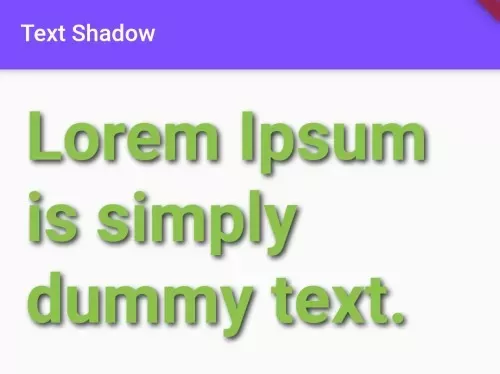
In this way, you can set font shadow on the Text Widget of Flutter.