
How to Add Radio Button in Flutter
In this example, we are going to show you how to add a radio button and use it in groups with options in Flutter App. The radio button is an important component that can be used in the form of data input from users. See the example below.
How to Add Radio Button?
Radio(
  value: "radio value",
  groupValue: "group value",
  onChanged: (value){
    print(value); //selected value
  }
)
You can add radio buttons in the Flutter app with Radio() widget. You have to pass the value for the button, the group value which can be used to switch the selection among radio buttons and onChange event which can be used to get the changed value when clicked on radio button.
How to Add Radio Button with Label:
RadioListTile(
    title: Text("Male"),
    value: "male",
    groupValue: "male",
    onChanged: (value){
      setState(() {

      });
    },
)
Detailed Example Code:
String? gender; //no radio button will be selected on initialColumn(
children: [
RadioListTile(
title: Text("Male"),
value: "male",
groupValue: gender,
onChanged: (value){
setState(() {
gender = value.toString();
});
},
),
RadioListTile(
title: Text("Female"),
value: "female",
groupValue: gender,
onChanged: (value){
setState(() {
gender = value.toString();
});
},
),
RadioListTile(
title: Text("Other"),
value: "other",
groupValue: gender,
onChanged: (value){
setState(() {
gender = value.toString();
});
},
)
],
)In this example, there will be two radio buttons, among them no radio button will be selected at the initial because we have passed nullable variable with null value on groupValue parameter. If you want to select some radio button by default, then set the value like below on initialization.
How to set default value among radio Buttons?
String gender = "male";Column(
children: [
RadioListTile(
title: Text("Male"),
value: "male",
groupValue: gender,
onChanged: (value){
setState(() {
gender = value.toString();
});
},
),
RadioListTile(
title: Text("Female"),
value: "female",
groupValue: gender,
onChanged: (value){
setState(() {
gender = value.toString();
});
},
),
RadioListTile(
title: Text("Other"),
value: "other",
groupValue: gender,
onChanged: (value){
setState(() {
gender = value.toString();
});
},
)
],
)Here, at the initial, the radio button with the value “male” will be selected.
Dart/Flutter App Example:
import 'package:flutter/material.dart';

void main(){
  runApp(MyApp());
}

class MyApp extends StatelessWidget{
  @override
  Widget build(BuildContext context) {
     return MaterialApp(
         theme: ThemeData(
           useMaterial3: false
         ),
         home: Home()
      );
  }
}

class Home extends  StatefulWidget {
  @override
  State<Home> createState() => _HomeState();
}

class _HomeState extends State<Home> {
  String? gender; //no radio button will be selected
  //String gender = "male"; //if you want to set default value
  @override
  Widget build(BuildContext context) {
    return Scaffold(
        appBar: AppBar(
            title: Text("Radio Button in Flutter"),
            backgroundColor: Colors.deepOrangeAccent,
        ),
        body: Container(
            padding: EdgeInsets.all(20),
            child:
          Column(
            children: [

                Text("What is your gender?", style: TextStyle(
                    fontSize: 18
                ),),

                Divider(),

                RadioListTile(
                    title: Text("Male"),
                    value: "male",
                    groupValue: gender,
                    onChanged: (value){
                      setState(() {
                          gender = value.toString();
                      });
                    },
                ),

                RadioListTile(
                    title: Text("Female"),
                    value: "female",
                    groupValue: gender,
                    onChanged: (value){
                      setState(() {
                          gender = value.toString();
                      });
                    },
                ),

                RadioListTile(
                      title: Text("Other"),
                      value: "other",
                      groupValue: gender,
                      onChanged: (value){
                        setState(() {
                            gender = value.toString();
                        });
                      },
                )
            ],
          ),
        ),
    );
  }
}
In this example, you can use the variable gender while submitting the form data.
Output Screenshot:
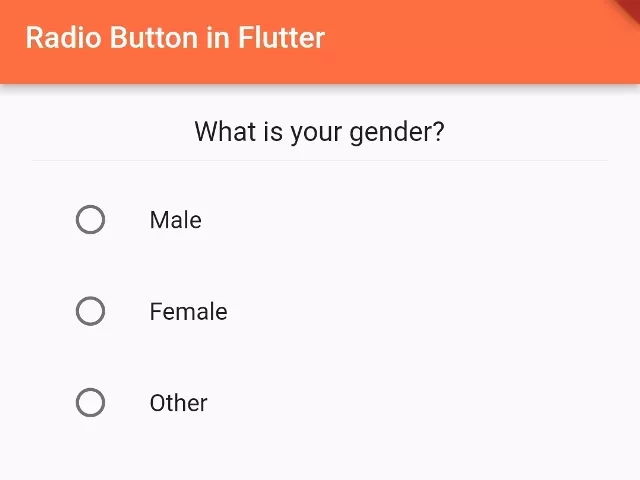
In this way, you can add radio buttons to the Flutter app.