
How to Fix Vertical Divider Not Showing in Flutter App
Verified Solution
Tested on Flutter 3.47.7 (Stable) • Dart 3.13.5
Jump to Updated Flutter Example ↓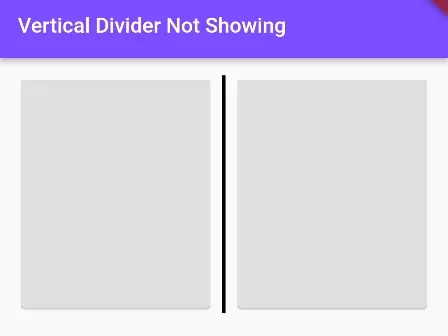
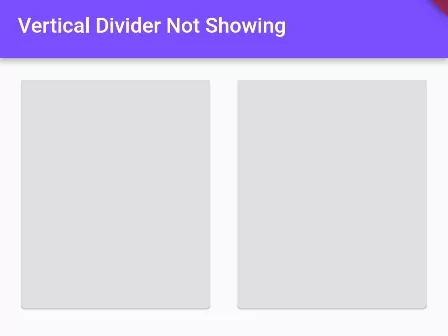
When you add Vertical Divider inside Row, Wrap widget, it may not display, or display with irregular height. The main reason of this reason is the unrestricted height of the parent widget of Row/Wrap widget. See the example below to solve this issue.
Solution 1: Wrap Row() with IntrinsicHeight():
IntrinsicHeight(
    child:Row(
        children: [
              VerticalDivider(
                color: Colors.black,
                thickness: 3, //thickness of divier line
              ),
        ]
    )
)
Solution 2: Wrap Row() with Container and give Height:
Container(
    height:200,
    child:Row(
        children: [
              VerticalDivider(
                color: Colors.black,
                thickness: 3, //thickness of divier line
              ),
        ]
    )
)
Full Code Example:
import 'package:flutter/material.dart';

void main() {
  runApp(
    MaterialApp( home: MyApp(),)
  );
}

class MyApp extends StatefulWidget{
  @override
  State<MyApp> createState() => _MyAppState();
}

class _MyAppState extends State<MyApp> {
  @override
  Widget build(BuildContext context) {
    return Scaffold(
          appBar: AppBar(
              title:Text("Vertical Divider Not Showing"),
              backgroundColor: Colors.deepPurpleAccent
          ),
          body: Container(
            padding: EdgeInsets.all(15),
             child: Column(
               children:[
                 IntrinsicHeight(
                   child:Row(
                       children: [
                            Expanded(
                              child:Card(
                                  child: Container(
                                      height: 200,
                                      color: Colors.black12,
                                  ),
                                ),
                            ),


                            VerticalDivider(
                              color: Colors.black,
                              thickness: 3, //thickness of divier line
                            ),


                            Expanded(
                              child:Card(
                                child: Container(
                                    height: 200,
                                    color: Colors.black12,
                                ),
                              ),
                            )
                       ],
                    )
                 )
               ]
             )
          )
      );
  }
}
Output Screenshot:
| When Row() is not wrapped | When Row() is wrapped |
 |  |
In this way, you can fix if the vertical divider is not showing in your app. Divider visibility issues frequently stem from unbounded flex parents; see the RenderFlex unbounded height constraints error and techniques for measuring device screen dimensions.
Updated Flutter Example
Updated Flutter Example
VerticalDivider Layout Architecture via IntrinsicHeight
Key Implementation Details & Modern Differences:
- IntrinsicHeight Architecture: Solves the infamous zero-height collapse of
VerticalDividerin unconstrained horizontal rows. - Material 3 Metric Layout: Showcases clean two-column metric cards with centered divider styling.
- Interactive Mode Toggle: Allows switching between IntrinsicHeight and explicit fixed bounds to inspect layout behavior.
Updated Flutter Example Code
import 'package:flutter/material.dart';

void main() {
  runApp(const MaterialApp(home: ModernVerticalDividerDemo()));
}

/// Production widget solving the classic zero-height VerticalDivider collapse in Row.
class ModernVerticalDividerDemo extends StatefulWidget {
  const ModernVerticalDividerDemo({super.key});

  @override
  State<ModernVerticalDividerDemo> createState() =>
      _ModernVerticalDividerDemoState();
}

class _ModernVerticalDividerDemoState extends State<ModernVerticalDividerDemo> {
  bool _useIntrinsicHeight = true;

  @override
  Widget build(BuildContext context) {
    final theme = Theme.of(context);

    return Scaffold(
      appBar: AppBar(title: const Text('VerticalDivider Layout Architecture')),
      body: SingleChildScrollView(
        padding: const EdgeInsets.all(20.0),
        child: Column(
          crossAxisAlignment: CrossAxisAlignment.start,
          children: [
            Text(
              'Metric Cards Separated by VerticalDivider:',
              style: theme.textTheme.titleMedium,
            ),
            const SizedBox(height: 16),
            Card(
              elevation: 0,
              color: theme.colorScheme.surfaceContainerHighest,
              shape: RoundedRectangleBorder(
                borderRadius: BorderRadius.circular(16),
              ),
              child: Padding(
                padding: const EdgeInsets.all(16.0),
                // IntrinsicHeight forces Row children to have bounded height, enabling VerticalDivider
                child: _useIntrinsicHeight
                    ? IntrinsicHeight(child: _buildMetricRow(context))
                    : SizedBox(height: 72.0, child: _buildMetricRow(context)),
              ),
            ),
            const SizedBox(height: 24),
            Row(
              children: [
                Expanded(
                  child: Text(
                    'Bounded Mode: ${_useIntrinsicHeight ? "IntrinsicHeight" : "Explicit SizedBox"}',
                    style: theme.textTheme.bodyMedium,
                  ),
                ),
                Switch(
                  value: _useIntrinsicHeight,
                  onChanged: (val) {
                    setState(() {
                      _useIntrinsicHeight = val;
                    });
                  },
                ),
              ],
            ),
          ],
        ),
      ),
    );
  }

  Widget _buildMetricRow(BuildContext context) {
    final theme = Theme.of(context);
    return Row(
      mainAxisAlignment: MainAxisAlignment.spaceEvenly,
      children: [
        Expanded(
          child: Column(
            mainAxisSize: MainAxisSize.min,
            children: [
              Text('Active Users', style: theme.textTheme.labelMedium),
              const SizedBox(height: 4),
              Text(
                '14,820',
                style: theme.textTheme.headlineSmall?.copyWith(
                  fontWeight: FontWeight.bold,
                ),
              ),
            ],
          ),
        ),
        const VerticalDivider(
          width: 24,
          thickness: 1.5,
          indent: 8,
          endIndent: 8,
        ),
        Expanded(
          child: Column(
            mainAxisSize: MainAxisSize.min,
            children: [
              Text('Performance', style: theme.textTheme.labelMedium),
              const SizedBox(height: 4),
              Text(
                '99.98%',
                style: theme.textTheme.headlineSmall?.copyWith(
                  fontWeight: FontWeight.bold,
                  color: theme.colorScheme.primary,
                ),
              ),
            ],
          ),
        ),
      ],
    );
  }
}
Document History & Archival Record
Original reference snapshot archived February 3, 2023. Updated working solution verified on modern Flutter & Dart SDKs.