
How to Resize Image File Size in Flutter
Restored from an archived snapshot captured 2022-11-28. Examples may refer to earlier Flutter versions.
In this example, we are going to show you how to resize the actual size of Image Unit8list in Flutter. To resize the image, you may need to load the image from assets or file storage or network URL to Unit8list bytes and later resize it. See the example below:
First, add image Flutter package in your project by adding the following lines in pubspec.yaml file.
dependencies:
  flutter:
    sdk: flutter
  image: ^3.2.2
Now, Load your image from Assets or File Storage or Network URL, here we are losing from URL:
import 'dart:typed_data';
import 'package:flutter/services.dart';
String imgurl = "https://www.fluttercampus.com/img/banner.png";
Uint8List bytes = (await NetworkAssetBundle(Uri.parse(imgurl)).load(imgurl)).buffer.asUint8List();Read this also for more context: How to Encode/Decode Path, File, Bytes, and Base64 in Dart/Flutter
Now, let’s resize the Image.
How to Resize Image in Flutter:
import 'package:image/image.dart' as IMG;IMG.Image? img = IMG.decodeImage(bytes);
IMG.Image resized = IMG.copyResize(img!, width: 200, height: 200);
Uint8List resizedImg = Uint8List.fromList(IMG.encodePng(resized));Here, the resizeImg is the resized image with a width and height of 200px.
Full App Example:
import 'dart:typed_data';
import 'package:flutter/material.dart';
import 'package:flutter/services.dart';
import 'package:image/image.dart' as IMG;

void main() async {
  runApp(MyApp());
}

class MyApp extends StatelessWidget{
  @override
  Widget build(BuildContext context) {
    return MaterialApp(
      home: Home(),
    );
  }
}

class Home extends StatefulWidget{
  @override
  _HomeState createState() => _HomeState();
}

class _HomeState extends State<Home> {

  Uint8List? resizedImg;
  Uint8List? bytes;

  @override
  void initState() {
    Future.delayed(Duration.zero, () async {
        String imgurl = "https://www.fluttercampus.com/img/banner.png";
        bytes = (await NetworkAssetBundle(Uri.parse(imgurl)).load(imgurl)).buffer.asUint8List();

        IMG.Image? img = IMG.decodeImage(bytes!);
        IMG.Image resized = IMG.copyResize(img!, width: 200, height: 200);
        resizedImg = Uint8List.fromList(IMG.encodePng(resized));

        setState(() {});
    });
    super.initState();
  }
  @override
  Widget build(BuildContext context) {
    return  Scaffold(
          appBar: AppBar(
              title: Text("Resize Image"),
              backgroundColor: Colors.redAccent,
          ),
          body: Container(
            padding: EdgeInsets.all(30),
            child: Column(
              children:[
                Text("Original Size"),
                bytes != null?Image.memory(bytes!):Container(),

                Text("Resize Size"),
                resizedImg != null?Image.memory(resizedImg!):Container(),

              ]
            )
          ),

       );
  }
}
Output Screenshot:
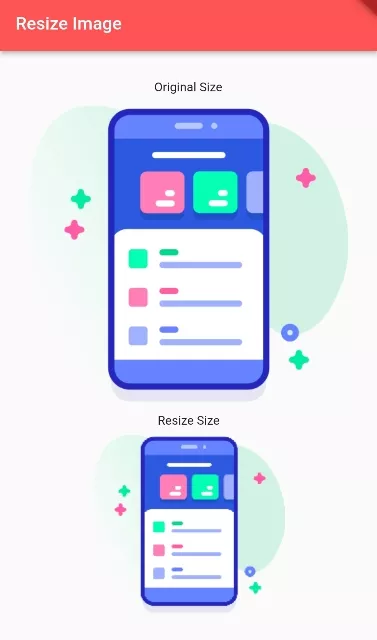
In this way, you can resize the actual Image size in Flutter.