
How to run Async ’await’ Code in initState() in Flutter App
Verified Solution
Tested on Flutter 3.47.7 • Dart 3.13.5
Jump to Updated Flutter Example ↓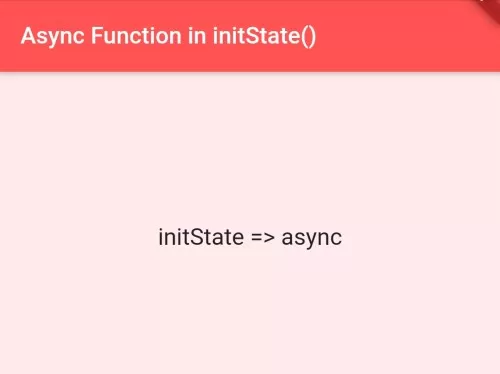
In this example, we are going to show the way to run or call asynchronous functions, codes inside initState() in Flutter Apps. Sometimes, you may need to execute async code while initializing app. But Flutter will show an error if you add ‘async’ modifier to initState. See the example below to solve this issue.
To Run Async ‘await’ codes, function inside initState():
@override
void initState() {
  //you are not allowed to add async modifier to initState
  Future.delayed(Duration.zero,() async {
        //your async 'await' codes goes here
  });
  super.initState();
}
OR:
@override
void initState() {
  getData();  //call async function.
  super.initState();
}

getData() async{
    //your 'await' code goes here
}
See the Full Flutter Example Below:
import 'package:flutter/material.dart';
void main() {
  runApp(MyApp());
}

class MyApp extends StatefulWidget{
  @override
  _MyAppState createState() => _MyAppState();
}

class _MyAppState extends State<MyApp> {

  @override
  void initState() {
    //you are not allowed to add async modifier to initState
    Future.delayed(Duration.zero,() async {
         String var1 = await testfunction();
         //here is the async code, you can execute any async code here
         print(var1);
    });

    super.initState();
  }

  //this is async test function
  Future<String> testfunction(){
    print("This is test function");
    return Future(()=>"abc");
  }

  @override
  Widget build(BuildContext context) {
    return MaterialApp(
        title: "Test App",
        home: Scaffold(
        appBar: AppBar(title:Text("Async Function in initState()")),
        body: Container(
          child: Center(
            child: Center(
              child: Text("initState => async"),
            ),
          ),
        )
      )
    );
  }
}
Console Output:
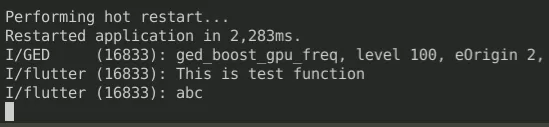
In this way, you can execute async ‘await’ codes inside initState() in Flutter App. When running asynchronous code during widget lifecycle setup, be careful to avoid the setState() called during build error and common LateInitializationError.
Updated Flutter Example
Updated Flutter Example
Safe Asynchronous Initialization & FutureBuilder Architecture
Key Implementation Details & Modern Differences:
- Synchronous initState Contract:
initState()cannot be markedasyncbecause Flutter expects it to return synchronously before the initial frame build. - Declarative FutureBuilder: Manages loading, success, and error states declaratively using
FutureBuilder, eliminating manual boolean flag tracking and race conditions. - Safe Lifecycle Disposal: Prevents calling
setState()on disposed widgets by initiating futures safely and relying on framework-managed subscription lifecycles.
Updated Flutter Example Code
import 'package:flutter/material.dart';

void main() {
  runApp(const MaterialApp(home: ModernAsyncInitDemo()));
}

class ModernAsyncInitDemo extends StatefulWidget {
  const ModernAsyncInitDemo({super.key});

  @override
  State<ModernAsyncInitDemo> createState() => _ModernAsyncInitDemoState();
}

class _ModernAsyncInitDemoState extends State<ModernAsyncInitDemo> {
  late Future<String> _initialDataFuture;

  @override
  void initState() {
    super.initState();
    // Initiate asynchronous operation safely without modifying initState signature
    _initialDataFuture = _fetchConfiguration();
  }

  Future<String> _fetchConfiguration() async {
    // Simulate asynchronous initialization delay
    await Future.delayed(const Duration(milliseconds: 50));
    return 'Production Configuration v3.47 Loaded';
  }

  @override
  Widget build(BuildContext context) {
    return Scaffold(
      appBar: AppBar(title: const Text('Safe Async Initialization')),
      body: Center(
        child: FutureBuilder<String>(
          future: _initialDataFuture,
          builder: (context, snapshot) {
            if (snapshot.connectionState == ConnectionState.waiting) {
              return const CircularProgressIndicator();
            }
            if (snapshot.hasError) {
              return Text('Initialization Error: ${snapshot.error}');
            }
            return Column(
              mainAxisAlignment: MainAxisAlignment.center,
              children: [
                const Icon(Icons.cloud_done, size: 48, color: Colors.green),
                const SizedBox(height: 12),
                Text(
                  snapshot.data ?? 'No data',
                  style: Theme.of(context).textTheme.titleMedium,
                ),
              ],
            );
          },
        ),
      ),
    );
  }
}
Document History & Archival Record
Original reference snapshot archived June 3, 2023. Updated working solution verified on modern Flutter & Dart SDKs.