
How to shape Container as Circle in Flutter App
Verified Solution
Tested on Flutter 3.47.7 • Dart 3.13.5
Jump to Updated Flutter Example ↓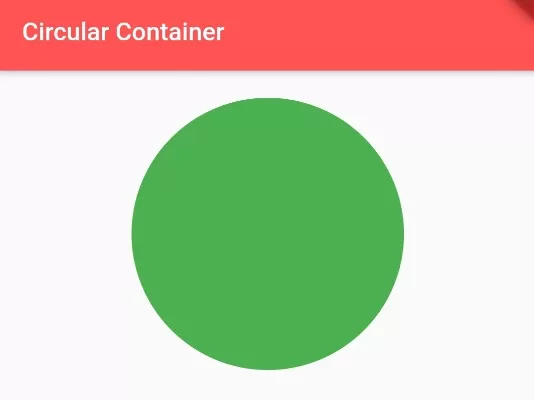
In this example, we are going to show you the easiest way to shape container as circle using circular border raius. We will use BoxDecoration() to shape container circular. see the example below:
How to make Container Circular:
Container(
    height:200,
    width: 200,
    decoration: BoxDecoration(
      color: Colors.green,
        borderRadius: BorderRadius.circular(100)
        //more than 50% of width makes circle
    ),
)
Here, container is square with equal height and width, and added circular border raius mroe than 50% of width of container.
Full Dart Code Example:
import 'package:flutter/material.dart';

void main() {
  runApp(MyApp());
}

class MyApp extends StatelessWidget {
  @override
  Widget build(BuildContext context) {
    return MaterialApp(
      home: Home(),
    );
  }
}

class Home extends StatelessWidget{
  @override
  Widget build(BuildContext context) {
     return Scaffold(
        appBar: AppBar(
           title: Text("Circular Container"),
           backgroundColor: Colors.redAccent,
        ),
        body: Container(
          alignment: Alignment.topCenter,
          padding: EdgeInsets.all(20),
           child: Container(
              height:200,
              width: 200,
              decoration: BoxDecoration(
                color: Colors.green,
                 borderRadius: BorderRadius.circular(100)
                 //more than 50% of width makes circle
              ),
           ),
        ),
     );
  }

}
Output Screenshot:

In this way, you can shape Container as circle with circular border radius in Flutter app. To maintain circular proportions across varied screen sizes, see how to apply auto aspect ratio on containers and combine with linear gradient backgrounds.
Updated Flutter Example
Updated Flutter Example
BoxShape.circle & Modern Avatar Architecture
Key Implementation Details & Modern Differences:
- BoxShape.circle Decoration: Leverages
shape: BoxShape.circleinBoxDecorationfor mathematically uniform circular borders without manual radius calculations. - High-DPI CircleAvatar Pairing: Demonstrates idiomatic
CircleAvatarwith foreground initials, fallback states, and gradient badge rings. - ClipOval vs Container Circle: Clarifies appropriate usage between vector shape decorations and raster clipping.
Updated Flutter Example Code
import 'package:flutter/material.dart';

void main() {
  runApp(const MaterialApp(home: ModernCircularContainerDemo()));
}

class ModernCircularContainerDemo extends StatefulWidget {
  const ModernCircularContainerDemo({super.key});

  @override
  State<ModernCircularContainerDemo> createState() =>
      _ModernCircularContainerDemoState();
}

class _ModernCircularContainerDemoState
    extends State<ModernCircularContainerDemo> {
  double _diameter = 100.0;

  @override
  Widget build(BuildContext context) {
    final theme = Theme.of(context);

    return Scaffold(
      appBar: AppBar(title: const Text('Circular Container Architecture')),
      body: Center(
        child: Column(
          mainAxisAlignment: MainAxisAlignment.center,
          children: [
            Container(
              width: _diameter,
              height: _diameter,
              decoration: BoxDecoration(
                shape: BoxShape.circle,
                gradient: LinearGradient(
                  colors: [
                    theme.colorScheme.primary,
                    theme.colorScheme.secondary,
                  ],
                  begin: Alignment.topLeft,
                  end: Alignment.bottomRight,
                ),
                border: Border.all(
                  color: theme.colorScheme.surface,
                  width: 4.0,
                ),
                boxShadow: const [
                  BoxShadow(
                    color: Colors.black26,
                    blurRadius: 10,
                    offset: Offset(0, 4),
                  ),
                ],
              ),
              alignment: Alignment.center,
              child: Text(
                'FD',
                key: const Key('avatar-initials'),
                style: TextStyle(
                  color: Colors.white,
                  fontWeight: FontWeight.bold,
                  fontSize: _diameter * 0.35,
                ),
              ),
            ),
            const SizedBox(height: 32),
            Row(
              mainAxisAlignment: MainAxisAlignment.center,
              children: [
                FilledButton.tonal(
                  onPressed: () => setState(() => _diameter = 140.0),
                  child: const Text('Large (140)'),
                ),
                const SizedBox(width: 12),
                FilledButton.tonal(
                  onPressed: () => setState(() => _diameter = 80.0),
                  child: const Text('Small (80)'),
                ),
              ],
            ),
            const Divider(height: 48),
            Text(
              'Modern Architecture: For circular containers, always use shape: BoxShape.circle '
              'rather than BorderRadius.circular(largeNumber). Pair with CircleAvatar for '
              'standard profile displays and ClipOval for clipping non-vector children.',
              textAlign: TextAlign.center,
              style: theme.textTheme.bodySmall?.copyWith(
                color: Colors.grey[700],
              ),
            ),
          ],
        ),
      ),
    );
  }
}
Document History & Archival Record
Original reference snapshot archived March 23, 2023. Updated working solution verified on modern Flutter & Dart SDKs.