
How to set Linear Gradient Background on Container in Flutter
Verified Solution
Tested on Flutter 3.47.7 (Stable) • Dart 3.13.5
Jump to Updated Flutter Example ↓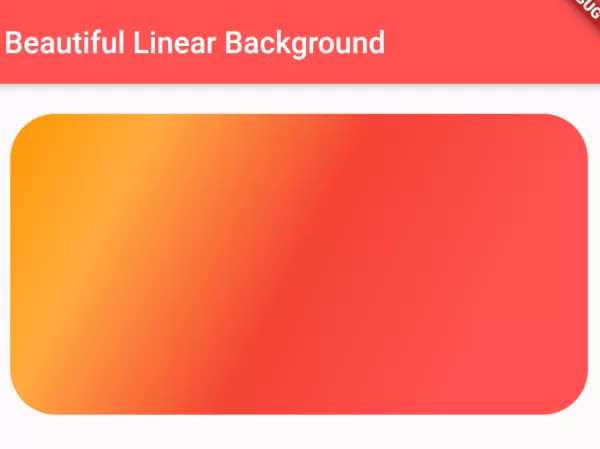
Flutter is known for its beautiful user interface (UI) design, in this guide as well, we are going to show you the way to set linear gradient background on Container. The UI looks beautiful with gradient background. See the code below and learn how to do it.
To set Linear Gradient Background on Container:
Container(
    height: 200,
    width:double.infinity,
    decoration: BoxDecoration(
        gradient:LinearGradient(
            colors: [
            Colors.orange,
            Colors.orangeAccent,
            Colors.red,
            Colors.redAccent
            //add more colors for gradient
            ],
            begin: Alignment.topLeft, //begin of the gradient color
            end: Alignment.bottomRight, //end of the gradient color
            stops: [0, 0.2, 0.5, 0.8] //stops for individual color
            //set the stops number equal to numbers of color
        ),
    ),
)
Full Dart Code:
import 'package:flutter/material.dart';
import 'package:flutter/widgets.dart';

void main() {
  runApp(MyApp());
}

class MyApp extends StatelessWidget{
  @override
  Widget build(BuildContext context) {
    return MaterialApp(
        title: "Test App",
        home: ContainerStyle(),
    );
  }
}

class ContainerStyle extends StatelessWidget{
  @override
  Widget build(BuildContext context) {
    return Scaffold(
        appBar: AppBar(
         title: Text("Beautiful Linear Background"),
         backgroundColor: Colors.redAccent,
       ),
       body:Container(
          margin: EdgeInsets.all(20),
          height: 200,
          width:double.infinity,
          decoration: BoxDecoration(
             gradient:LinearGradient(
                  colors: [
                    Colors.orange,
                    Colors.orangeAccent,
                    Colors.red,
                    Colors.redAccent
                    //add more colors for gradient
                   ],
                  begin: Alignment.topLeft, //begin of the gradient color
                  end: Alignment.bottomRight, //end of the gradient color
                  stops: [0, 0.2, 0.5, 0.8] //stops for individual color
                  //set the stops number equal to numbers of color
             ),

             borderRadius: BorderRadius.circular(30), //border corner radius

          ),
       ),
    );
  }
}
Output Screenshot:
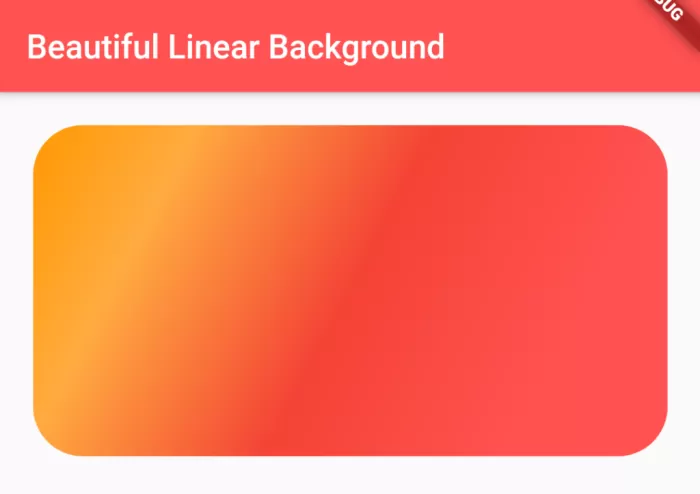
In this way, you can set linear gradient background to the Container() widget in Flutter. To extend gradient styling to interactive buttons, see how to apply gradient backgrounds on ElevatedButtons or configure transparent background colors in Flutter.
Updated Flutter Example
Updated Flutter Example
Container LinearGradient Architecture & Alignment
Key Implementation Details & Modern Differences:
- Vector Color Blending: Employs
BoxDecoration(gradient: LinearGradient())with configurable start and end alignment anchors. - Color Scheme Harmonization: Integrates gradient stops with Material 3 container tokens for smooth dynamic light/dark contrast.
- Elevation Glow Effect: Pairs container gradient with matching ambient
BoxShadowfor high-end modern visual depth.
Updated Flutter Example Code
import 'package:flutter/material.dart';

void main() {
  runApp(const MaterialApp(home: ModernLinearGradientDemo()));
}

/// Production architecture for BoxDecoration LinearGradients in Flutter.
class ModernLinearGradientDemo extends StatefulWidget {
  const ModernLinearGradientDemo({super.key});

  @override
  State<ModernLinearGradientDemo> createState() =>
      _ModernLinearGradientDemoState();
}

class _ModernLinearGradientDemoState extends State<ModernLinearGradientDemo> {
  int _paletteIndex = 0;

  static const List<List<Color>> _palettes = [
    [Color(0xFF6750A4), Color(0xFFD0BCFF)], // Purple
    [Color(0xFF006A6A), Color(0xFF80D5D4)], // Teal
    [Color(0xFF984061), Color(0xFFFFD9E2)], // Rose
  ];

  @override
  Widget build(BuildContext context) {
    final theme = Theme.of(context);
    final currentColors = _palettes[_paletteIndex];

    return Scaffold(
      appBar: AppBar(
        title: const Text('LinearGradient Container Architecture'),
      ),
      body: SingleChildScrollView(
        padding: const EdgeInsets.all(20.0),
        child: Column(
          crossAxisAlignment: CrossAxisAlignment.stretch,
          children: [
            // Container with LinearGradient
            Container(
              height: 200,
              decoration: BoxDecoration(
                borderRadius: BorderRadius.circular(20),
                gradient: LinearGradient(
                  begin: Alignment.topLeft,
                  end: Alignment.bottomRight,
                  colors: currentColors,
                ),
                boxShadow: [
                  BoxShadow(
                    color: currentColors.first.withValues(alpha: 0.3),
                    blurRadius: 16,
                    offset: const Offset(0, 8),
                  ),
                ],
              ),
              alignment: Alignment.center,
              child: const Text(
                'Material 3 Linear Gradient',
                key: Key('gradient-container-text'),
                style: TextStyle(
                  color: Colors.white,
                  fontSize: 20,
                  fontWeight: FontWeight.bold,
                ),
              ),
            ),
            const SizedBox(height: 24),
            Text('Palette Selector:', style: theme.textTheme.titleMedium),
            const SizedBox(height: 12),
            SegmentedButton<int>(
              segments: const [
                ButtonSegment(value: 0, label: Text('Royal Purple')),
                ButtonSegment(value: 1, label: Text('Deep Teal')),
                ButtonSegment(value: 2, label: Text('Rose Berry')),
              ],
              selected: {_paletteIndex},
              onSelectionChanged: (val) {
                setState(() => _paletteIndex = val.first);
              },
            ),
          ],
        ),
      ),
    );
  }
}
Document History & Archival Record
Original reference snapshot archived February 2, 2023. Updated working solution verified on modern Flutter & Dart SDKs.