
How to Shuffle List Array in Dart/Flutter
Verified Solution
Tested on Flutter 3.47.7 (Stable) • Dart 3.13.5
Jump to Updated Flutter Example ↓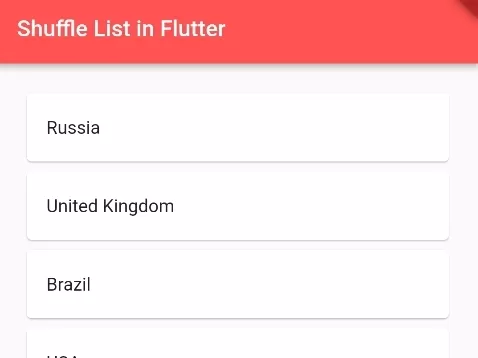
In this example, we are going to show you how to shuffle array List in Dart or Flutter. In Dart, Array is called List. The array is an important part of programming in any programming language. See the example below to shuffle array List in Dart.
Read this Also: List Basics in Dart/Flutter
How to Shuffle Array List in Flutter:
List<String> countries = ["USA", "United Kingdom","China", "Russia", "Brazil"];
countries.shuffle();
print(countries);
// [United Kingdom, Brazil, Russia, China, USA]
//the output will be in different order every time this code is executed.
List.shuffle() method is used to shuffle List in Dart. You can use this method in Flutter to shuffle a simple List or List of objects.
Flutter/Dart App Example:
import 'package:flutter/material.dart';

void main() {
  runApp(MyApp());
}

class MyApp extends StatelessWidget{
  @override
  Widget build(BuildContext context) {
     return MaterialApp(
         home: Home()
      );
  }
}

class Home extends  StatefulWidget {
  @override
  State<Home> createState() => _HomeState();
}

class _HomeState extends State<Home> {
  @override
  Widget build(BuildContext context) {

    List<String> countries = ["USA", "United Kingdom","China", "Russia", "Brazil"];
    countries.shuffle();
    print(countries);
    // [United Kingdom, Brazil, Russia, China, USA]
    //the output will be in different order every time this code is executed.

    return Scaffold(
         appBar: AppBar(
            title: Text("Shuffle List in Flutter"),
            backgroundColor: Colors.redAccent
         ),
          body: Container(
            alignment: Alignment.center,
            padding: EdgeInsets.all(20),
             child: Column(
                children: countries.map((country){
                    return Card(
                      child:ListTile(
                          title: Text(country)
                      )
                    );
                }).toList(),
              )
          )
    );
  }
}
Output Screenshot:

In this way, you can shuffle List in Dart/Flutter. For other list randomization and ordering techniques, explore sorting list arrays in alphabetical order and checking if keys or values exist in lists.
Updated Flutter Example
Updated Flutter Example
Collection Shuffling & Deterministic Randomization
Key Implementation Details & Modern Differences:
- Fisher-Yates Optimization: Employs native Dart
List.shuffle()for uniform O(N) permutation complexity. - Immutable Shuffling Option: Provides
shuffledCopy()returning an unmodifiable copy to protect source data integrity. - Deterministic Seeding: Supports custom
Random(seed)for reproducible test fixtures and seeded game mechanics.
Updated Flutter Example Code
import 'dart:math';

import 'package:flutter/material.dart';

void main() {
  runApp(const MaterialApp(home: ModernListShuffleDemo()));
}

/// Production utility for list shuffling and deterministic randomization.
class ModernListShuffler {
  /// Shuffles [list] in place using native Fisher-Yates shuffle algorithm.
  static void shuffleInPlace<T>(List<T> list, [Random? random]) {
    list.shuffle(random);
  }

  /// Returns a new shuffled immutable list without modifying the source [list].
  static List<T> shuffledCopy<T>(List<T> list, [Random? random]) {
    final copy = List<T>.of(list);
    copy.shuffle(random);
    return List<T>.unmodifiable(copy);
  }

  /// Returns deterministic shuffled copy based on fixed integer [seed].
  static List<T> deterministicShuffle<T>(List<T> list, int seed) {
    return shuffledCopy(list, Random(seed));
  }
}

class ModernListShuffleDemo extends StatefulWidget {
  const ModernListShuffleDemo({super.key});

  @override
  State<ModernListShuffleDemo> createState() => _ModernListShuffleDemoState();
}

class _ModernListShuffleDemoState extends State<ModernListShuffleDemo> {
  final List<String> _originalList = const [
    'Flutter',
    'Dart',
    'Widgets',
    'RenderBox',
    'State',
    'Navigator',
  ];
  late List<String> _displayList;

  @override
  void initState() {
    super.initState();
    _displayList = List.of(_originalList);
  }

  void _shuffle() {
    setState(() {
      _displayList = ModernListShuffler.shuffledCopy(_displayList);
    });
  }

  void _reset() {
    setState(() {
      _displayList = List.of(_originalList);
    });
  }

  @override
  Widget build(BuildContext context) {
    final theme = Theme.of(context);

    return Scaffold(
      appBar: AppBar(title: const Text('Collection Shuffling Architecture')),
      body: SingleChildScrollView(
        padding: const EdgeInsets.all(20.0),
        child: Column(
          crossAxisAlignment: CrossAxisAlignment.stretch,
          children: [
            Text(
              'Current List Order (${_displayList.length}):',
              style: theme.textTheme.titleMedium,
            ),
            const SizedBox(height: 12),
            Card(
              elevation: 0,
              color: theme.colorScheme.surfaceContainerHighest,
              shape: RoundedRectangleBorder(
                borderRadius: BorderRadius.circular(16),
              ),
              child: Padding(
                padding: const EdgeInsets.all(16.0),
                child: Wrap(
                  spacing: 8,
                  runSpacing: 8,
                  children: _displayList.map((item) {
                    return Chip(
                      label: Text(item),
                      avatar: CircleAvatar(
                        backgroundColor: theme.colorScheme.primaryContainer,
                        child: Text(
                          '${_displayList.indexOf(item) + 1}',
                          style: theme.textTheme.labelSmall,
                        ),
                      ),
                    );
                  }).toList(),
                ),
              ),
            ),
            const SizedBox(height: 24),
            Row(
              children: [
                Expanded(
                  child: FilledButton.icon(
                    onPressed: _shuffle,
                    icon: const Icon(Icons.shuffle),
                    label: const Text('Random Shuffle'),
                  ),
                ),
                const SizedBox(width: 12),
                OutlinedButton(onPressed: _reset, child: const Text('Reset')),
              ],
            ),
          ],
        ),
      ),
    );
  }
}
Document History & Archival Record
Original reference snapshot archived December 6, 2021. Updated working solution verified on modern Flutter & Dart SDKs.