
How to Add or Subtract Days from DateTime in Dart/Flutter
Verified Solution
Tested on Flutter 3.47.7 • Dart 3.13.5
Jump to Updated Flutter Example ↓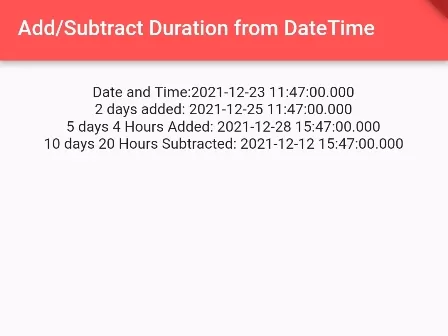
In this example, we are going to show you the easiest way to add or subtract duration from DateTime in Dart and Flutter. You will learn to add or subtract durations on days, seconds, minutes, hours, and more. See the example below:
DateTime.add(Duration):
DateTime dt1 = DateTime.parse("2021-12-23 11:47:00");

DateTime dt2 = dt1.add(Duration(seconds: 10));
print(dt2);
//Output: 2021-12-23 11:47:10.000

DateTime dt3 = dt1.add(Duration(minutes: 10, seconds: 30));
print(dt3);
//Output: 2021-12-23 11:57:30.000

DateTime dt4 = dt1.add(Duration(hours: 20));
print(dt4);
//Output: 2021-12-24 07:47:00.000

DateTime dt5 = dt1.add(Duration(days: 20));
print(dt5);
//Output: 2022-01-12 11:47:00.000
DateTime.subtract(Duration):
DateTime dt1 = DateTime.parse("2021-12-23 11:47:00");

DateTime dt2 = dt1.subtract(Duration(seconds: 10));
print(dt2);
//Output: 2021-12-23 11:46:50.000

DateTime dt3 = dt1.subtract(Duration(minutes: 10, seconds: 30));
print(dt3);
//Output: 2021-12-23 11:36:30.000

DateTime dt4 = dt1.subtract(Duration(hours: 20));
print(dt4);
//Output: 2021-12-22 15:47:00.000

DateTime dt5 = dt1.subtract(Duration(days: 20));
print(dt5);
//Output: 2021-12-03 11:47:00.000
Flutter/Dart Example:
import 'package:flutter/material.dart';

void main() {
  runApp( MaterialApp(
       home: Home()
  ));
}

class Home extends  StatefulWidget {
  @override
  State<Home> createState() => _HomeState();
}

class _HomeState extends State<Home> {

  @override
  Widget build(BuildContext context) {

    DateTime dt1 = DateTime.parse("2021-12-23 11:47:00");

    return Scaffold(
         appBar: AppBar(
            title: Text("Add/Subtract Duration from DateTime"),
            backgroundColor: Colors.redAccent,
         ),
          body: Container(
             alignment: Alignment.center,
             padding: EdgeInsets.all(20),
             child: Column(
               children:[

                      Text("Date and Time:" + dt1.toString()),

                      Text("2 days added: " + dt1.add(Duration(days: 2)).toString()),
                      Text("5 days 4 Hours Added: " + dt1.add(Duration(days: 5, hours: 4)).toString()),

                      Text("10 days 20 Hours Subtracted: " + dt1.subtract(Duration(days: 10, hours: 20)).toString()),

                ]
             ),
          )
      );
  }
}
Output Screenshot:

In this way, you can add or subtract duration from Date and Time in Dart/Flutter. To compare modified dates against baseline timestamps, see how to handle calculating difference between two DateTime instances and comparing DateTime instances in Dart.
Updated Flutter Example
Updated Flutter Example
DateTime Arithmetic & Duration Calculations
Key Implementation Details & Modern Differences:
- Calendar vs. Elapsed Duration Math: Distinguishes calendar-day progression via
DateTime(year, month, day + N, ...)(which preserves local wall-clock time across 23h/25h DST transitions) from physical elapsed duration viaDateTime.add(Duration(days: N))(strict 86,400s intervals). - Deterministic Boundary Arithmetic: Provides predictable date progression across month, leap-year, and year boundaries with full Dart immutability guarantees.
- Material 3 Interactive Architecture: Features a segmented toggle between Calendar Days and Elapsed Duration, paired with tonal step buttons and live date rendering.
Updated Flutter Example Code
import 'package:flutter/material.dart';

void main() {
  runApp(const MaterialApp(home: ModernDateArithmeticDemo()));
}

/// Helper methods distinguishing Calendar Date math from Elapsed Duration math.
class DateArithmetic {
  /// Calendar-Date Arithmetic:
  /// Preserves local wall-clock time across Daylight Saving Time (DST) transitions,
  /// leap years, and month/year boundaries.
  static DateTime addCalendarDays(DateTime date, int days) {
    return DateTime(
      date.year,
      date.month,
      date.day + days,
      date.hour,
      date.minute,
      date.second,
      date.millisecond,
      date.microsecond,
    );
  }

  /// Physical Elapsed-Duration Arithmetic:
  /// Adds exact 24-hour elapsed duration (86,400 seconds per day).
  /// Note: On DST transition days (23h or 25h long), this may shift local wall-clock time.
  static DateTime addElapsedDuration(DateTime date, int days) {
    return date.add(Duration(days: days));
  }
}

class ModernDateArithmeticDemo extends StatefulWidget {
  const ModernDateArithmeticDemo({super.key});

  @override
  State<ModernDateArithmeticDemo> createState() =>
      _ModernDateArithmeticDemoState();
}

class _ModernDateArithmeticDemoState extends State<ModernDateArithmeticDemo> {
  DateTime _currentDate = DateTime(2026, 10, 17, 14, 30);
  bool _useCalendarMath = true;

  void _modifyDate(int days) {
    setState(() {
      if (_useCalendarMath) {
        _currentDate = DateArithmetic.addCalendarDays(_currentDate, days);
      } else {
        _currentDate = DateArithmetic.addElapsedDuration(_currentDate, days);
      }
    });
  }

  @override
  Widget build(BuildContext context) {
    final theme = Theme.of(context);
    final dateFormatted =
        '${_currentDate.year}-${_currentDate.month.toString().padLeft(2, '0')}-${_currentDate.day.toString().padLeft(2, '0')}';
    final timeFormatted =
        '${_currentDate.hour.toString().padLeft(2, '0')}:${_currentDate.minute.toString().padLeft(2, '0')}';

    return Scaffold(
      appBar: AppBar(title: const Text('DateTime Arithmetic in Dart 3')),
      body: Padding(
        padding: const EdgeInsets.all(20.0),
        child: Column(
          crossAxisAlignment: CrossAxisAlignment.start,
          children: [
            Card.outlined(
              child: Padding(
                padding: const EdgeInsets.all(20.0),
                child: Column(
                  crossAxisAlignment: CrossAxisAlignment.start,
                  children: [
                    Text(
                      'Current Calculated Date:',
                      style: theme.textTheme.titleMedium,
                    ),
                    const SizedBox(height: 8),
                    Text(
                      '$dateFormatted  $timeFormatted',
                      key: const Key('date-display'),
                      style: theme.textTheme.headlineSmall?.copyWith(
                        fontWeight: FontWeight.bold,
                        color: theme.colorScheme.primary,
                      ),
                    ),
                    const SizedBox(height: 8),
                    Text(
                      _useCalendarMath
                          ? 'Mode: Calendar-Date Math (Preserves Wall-Clock Across DST)'
                          : 'Mode: Elapsed-Duration Math (Strict 24h Intervals)',
                      style: TextStyle(
                        color: _useCalendarMath
                            ? Colors.teal
                            : Colors.orange[800],
                        fontWeight: FontWeight.w600,
                        fontSize: 13,
                      ),
                    ),
                  ],
                ),
              ),
            ),
            const SizedBox(height: 16),
            SegmentedButton<bool>(
              segments: const [
                ButtonSegment(
                  value: true,
                  label: Text('Calendar Days'),
                  icon: Icon(Icons.calendar_month),
                ),
                ButtonSegment(
                  value: false,
                  label: Text('Elapsed (24h)'),
                  icon: Icon(Icons.timer_outlined),
                ),
              ],
              selected: {_useCalendarMath},
              onSelectionChanged: (val) {
                setState(() => _useCalendarMath = val.first);
              },
            ),
            const SizedBox(height: 20),
            Wrap(
              spacing: 12,
              runSpacing: 12,
              children: [
                FilledButton.tonal(
                  onPressed: () => _modifyDate(-1),
                  child: const Text('-1 Day'),
                ),
                FilledButton(
                  onPressed: () => _modifyDate(1),
                  child: const Text('+1 Day'),
                ),
                FilledButton.tonal(
                  onPressed: () => _modifyDate(7),
                  child: const Text('+1 Week'),
                ),
                OutlinedButton(
                  onPressed: () {
                    setState(
                      () => _currentDate = DateTime(2026, 10, 17, 14, 30),
                    );
                  },
                  child: const Text('Reset'),
                ),
              ],
            ),
            const Divider(height: 36),
            Text(
              'Architectural Note: Official Dart documentation warns that DateTime.add(Duration(days: 1)) '
              'adds 86,400 elapsed seconds, which shifts local wall-clock hours across 23h/25h Daylight '
              'Saving Time changes. For local calendar progression, use DateTime constructor arithmetic.',
              style: theme.textTheme.bodySmall?.copyWith(
                color: Colors.grey[700],
              ),
            ),
          ],
        ),
      ),
    );
  }
}
Document History & Archival Record
Original reference snapshot archived November 28, 2021. Updated working solution verified on modern Flutter & Dart SDKs.