
How to Create Horizontal ListView in Flutter
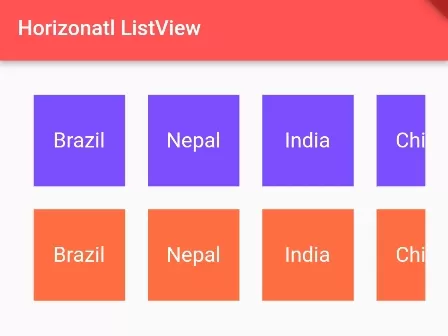
In this example, we are going to show you how to create a Horizontal scroll view or List view in Flutter App. We will set Scroll direction to Horizontal on ListView or SingleChildScrollView() widgets to make a Horizontal scroll view. See the example below:
How to Change Scroll Direction of ListView?
ListView(
  scrollDirection: Axis.horizontal,
  children:[]
)
By default, the scroll direction of ListView is vertical, you can use scrollDirection property to change scroll direction to Horizontal. You have to pass Axis value on this property.
Now, we will use this property to make Horizontal ListView:
How to Add ListView with Horizontal Scrolling?
List<String> countries = ["Brazil", "Nepal", "India", "China", "USA", "Canada"];ListView(
scrollDirection: Axis.horizontal,
children: countries.map((country){
return Container(
color: Colors.orangeAccent,
height: 100, width:150,
alignment: Alignment.center
child: Text(country)
);
}).toList(),
)Here, we have made the list of Countries on ListView and set the scroll direction to Horizontal. We can achieve this feature using SingleChildScrollView() and Row() widgets as well.
List<String> countries = ["Brazil", "Nepal", "India", "China", "USA", "Canada"];SingleChildScrollView(
scrollDirection: Axis.horizontal,
child:Row(
children: countries.map((country){
return Container(
color: Colors.orangeAccent,
height: 100, width:150,
alignment: Alignment.center
child: Text(country)
);
}).toList(),
)
)Here, we have wrapped infinite Row() with SingleChildScrollView() to add scrolling on overflowed Row width. And we have changed the scroll direction to Horizontal.
Full Dart/Flutter App Example:
import 'package:flutter/material.dart';

void main() {
  runApp(MyApp());
}

class MyApp extends StatelessWidget{
  @override
  Widget build(BuildContext context) {
     return MaterialApp(
         home: Home()
      );
  }
}

class Home extends  StatefulWidget {
  @override
  State<Home> createState() => _HomeState();
}

class _HomeState extends State<Home> {
  List<String> countries = ["Brazil", "Nepal", "India", "China", "USA", "Canada"];
  @override
  Widget build(BuildContext context) {
    return Scaffold(
         appBar: AppBar(
            title: Text("Horizonatl ListView"),
            backgroundColor: Colors.redAccent,
         ),

         body: Container(
                padding: EdgeInsets.all(20),
                child: Column(
                  children: [

                      Container(
                        height: 100,
                        child:ListView(
                          scrollDirection: Axis.horizontal,
                          children: countries.map((country){
                               return box(country, Colors.deepPurpleAccent);
                          }).toList(),
                        )
                      ),

                      Container(
                        height: 100,
                        child:SingleChildScrollView(
                            scrollDirection: Axis.horizontal,
                            child:Row(
                            children: countries.map((country){
                                return box(country, Colors.deepOrangeAccent);
                            }).toList(),
                          )
                        )
                      )

                  ],
                )
            )

    );
  }

  Widget box(String title, Color backgroundcolor){
     return Container(
        margin: EdgeInsets.all(10),
        width: 80,
        color: backgroundcolor,
        alignment: Alignment.center,
        child: Text(title, style:TextStyle(
                     color: Colors.white,
                     fontSize: 20))
     );
  }
}
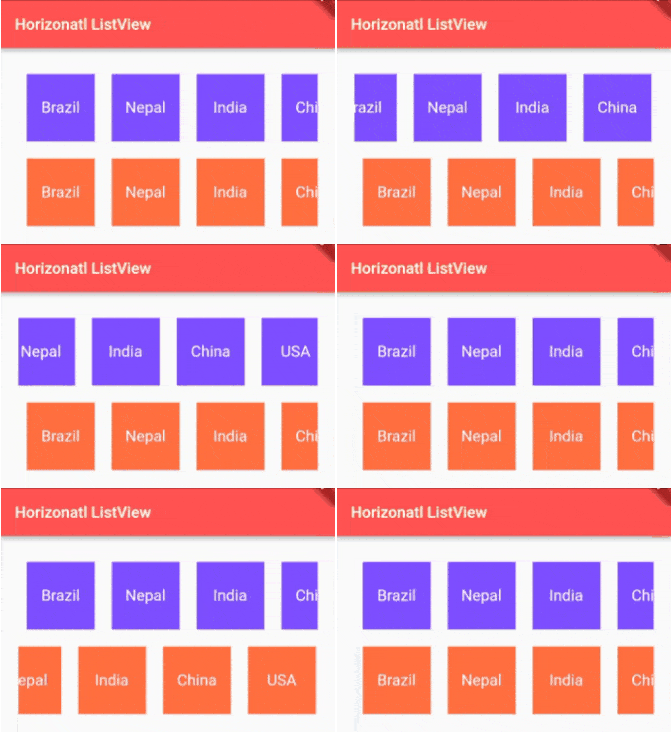
In this example, we have made two Scroll Views, one is using ListView() and one is using SingleChildScrollView(). Both have scroll direction to the Horizontal axis.
Output Screenshot:

In this way, you can make Horizontal Scroll View using ListView() and SingleChildScrollView() widget in Flutter. For structured tabular alternatives, explore creating tables with rows and columns and review array list basics in Dart.
Updated Flutter Example
Horizontal Scrolling with Material 3 Virtualized Cards
Key Implementation Details & Modern Differences:
- Explicit Cross-Axis Height Bounds: Horizontal list views require an explicit vertical constraint (via
SizedBoxorAspectRatio) to prevent parent Column collapse. - Virtualized Item Separation: Replaces manual row mapping with
ListView.separated(scrollDirection: Axis.horizontal), delivering high-performance lazy viewport virtualization with uniform item spacing. - Modern Material 3 Token Styling: Uses modern M3 Card surfaces and
Color.withValues(alpha: ...)to avoid precision loss from deprecatedwithOpacity().
import 'package:flutter/material.dart';

void main() {
  runApp(const MaterialApp(home: ModernHorizontalListDemo()));
}

class ModernHorizontalListDemo extends StatelessWidget {
  const ModernHorizontalListDemo({super.key});

  static const _categories = [
    ('Flutter Basics', Icons.flutter_dash, Colors.blue),
    ('State Management', Icons.memory, Colors.purple),
    ('Animations', Icons.auto_awesome, Colors.amber),
    ('Networking', Icons.cloud_sync, Colors.teal),
    ('SQLite Storage', Icons.storage, Colors.indigo),
    ('Material 3', Icons.palette, Colors.pink),
  ];

  @override
  Widget build(BuildContext context) {
    return Scaffold(
      appBar: AppBar(title: const Text('Horizontal ListView Demo')),
      body: Padding(
        padding: const EdgeInsets.symmetric(vertical: 24.0),
        child: Column(
          crossAxisAlignment: CrossAxisAlignment.start,
          children: [
            const Padding(
              padding: EdgeInsets.symmetric(horizontal: 20.0),
              child: Text(
                'Explore Topics (Scroll Horizontally):',
                style: TextStyle(fontSize: 18, fontWeight: FontWeight.bold),
              ),
            ),
            const SizedBox(height: 16),
            // Explicit height container prevents unbounded vertical constraint crashes
            SizedBox(
              height: 175,
              child: ListView.separated(
                scrollDirection: Axis.horizontal,
                padding: const EdgeInsets.symmetric(horizontal: 20.0),
                itemCount: _categories.length,
                separatorBuilder: (context, index) => const SizedBox(width: 14),
                itemBuilder: (context, index) {
                  final (title, icon, color) = _categories[index];
                  return SizedBox(
                    width: 140,
                    child: Card(
                      elevation: 2,
                      shape: RoundedRectangleBorder(
                        borderRadius: BorderRadius.circular(16),
                      ),
                      child: InkWell(
                        borderRadius: BorderRadius.circular(16),
                        onTap: () {
                          ScaffoldMessenger.of(context).showSnackBar(
                            SnackBar(content: Text('Selected: $title')),
                          );
                        },
                        child: Padding(
                          padding: const EdgeInsets.all(12.0),
                          child: Column(
                            mainAxisAlignment: MainAxisAlignment.center,
                            children: [
                              CircleAvatar(
                                backgroundColor: color.withValues(alpha: 0.15),
                                foregroundColor: color,
                                radius: 24,
                                child: Icon(icon, size: 26),
                              ),
                              const SizedBox(height: 8),
                              Text(
                                title,
                                textAlign: TextAlign.center,
                                style: const TextStyle(
                                  fontWeight: FontWeight.w600,
                                  fontSize: 13,
                                ),
                              ),
                            ],
                          ),
                        ),
                      ),
                    ),
                  );
                },
              ),
            ),
          ],
        ),
      ),
    );
  }
}
Document History & Archival Record
Original reference snapshot archived March 22, 2023. Updated working solution verified on modern Flutter & Dart SDKs.