
How to Convert Image to Base64 Encoding in Flutter/Dart
In this example, we are going to show you how to convert image path to File, Uint8List bytes, and encode it to base64 or decode back base64 string to bytes. See the example below:
How to Encode Image Path to base64 String:
import 'dart:convert';
import 'dart:io';
import 'dart:typed_data';
String imagepath = " /data/user/img.jpg";
//image path, you can get it with image_picker package
File imagefile = File(imagepath); //convert Path to File
Uint8List imagebytes = await imagefile.readAsBytes(); //convert to bytes
String base64string = base64.encode(imagebytes); //convert bytes to base64 string
print(base64string);
/* Output:
/9j/4Q0nRXhpZgAATU0AKgAAAAgAFAIgAAQAAAABAAAAAAEAAAQAAAABAAAJ3
wIhAAQAAAABAAAAAAEBAAQAAAABAAAJ5gIiAAQAAAABAAAAAAIjAAQAAAABAAA
AAAIkAAQAAAABAAAAAAIlAAIAAAAgAAAA/gEoAA ... long string output
*/ How to decode base64 Image to Bytes:
import 'dart:convert';
import 'dart:typed_data';
Uint8List decodedbytes = base64.decode(base64string);
//decode base64 stirng to bytesFor more information about decoding/encoding files: How to Encode/Decode Path, File, Bytes, and Base64 in Dart/Flutter
Full Flutter App Example:
In this example, we are going to make an image picker and convert it to a base64 string. To make an image picker, we have used image_picker Flutter package, add this package to your project by adding the following lines in pubspec.yaml file.
import 'dart:convert';
import 'dart:io';
import 'dart:typed_data';
import 'package:flutter/material.dart';
import 'package:image_picker/image_picker.dart';
void main() {
runApp(MyApp());
}
class MyApp extends StatelessWidget{
@override
Widget build(BuildContext context) {
return MaterialApp(
home: Home()
);
}
}
class Home extends StatefulWidget {
@override
State<Home> createState() => _HomeState();
}
class _HomeState extends State<Home> {
final ImagePicker imgpicker = ImagePicker();
String imagepath = "";
openImage() async {
try {
var pickedFile = await imgpicker.pickImage(source: ImageSource.gallery);
//you can use ImageCourse.camera for Camera capture
if(pickedFile != null){
imagepath = pickedFile.path;
print(imagepath);
//output /data/user/0/com.example.testapp/cache/image_picker7973898508152261600.jpg
File imagefile = File(imagepath); //convert Path to File
Uint8List imagebytes = await imagefile.readAsBytes(); //convert to bytes
String base64string = base64.encode(imagebytes); //convert bytes to base64 string
print(base64string);
/* Output:
/9j/4Q0nRXhpZgAATU0AKgAAAAgAFAIgAAQAAAABAAAAAAEAAAQAAAABAAAJ3
wIhAAQAAAABAAAAAAEBAAQAAAABAAAJ5gIiAAQAAAABAAAAAAIjAAQAAAABAAA
AAAIkAAQAAAABAAAAAAIlAAIAAAAgAAAA/gEoAA ... long string output
*/
Uint8List decodedbytes = base64.decode(base64string);
//decode base64 stirng to bytes
setState(() {
});
}else{
print("No image is selected.");
}
}catch (e) {
print("error while picking file.");
}
}
@override
Widget build(BuildContext context) {
return Scaffold(
appBar: AppBar(
title: Text("Image to base64 Encoding"),
backgroundColor: Colors.redAccent,
),
body: Container(
alignment: Alignment.center,
padding: EdgeInsets.all(20),
child: Column(
children: [
imagepath != ""?Image.file(File(imagepath)):
Container(
child: Text("No Image selected."),
),
//open button ----------------
ElevatedButton(
onPressed: (){
openImage();
},
child: Text("Open Image")
),
]
),
)
);
}
}Output on Terminal when Image is picked:
Output Screenshot:
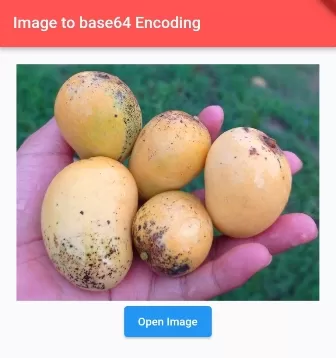
In this way, you can encode or decode Image to base64 string or vice versa in Dart/Flutter App. To learn more about Base64 conversions, explore how to encode and decode path, file, and bytes in Base64 or resize image files in Flutter.
Updated Flutter Example
Bidirectional Base64 Image Encoding & Decoding
Key Implementation Details & Modern Differences:
- Data URI Support: Seamlessly encodes and decodes standard
data:image/png;base64,...schemes. - Format Magic Bytes: Automatically detects PNG, JPEG, GIF, and WEBP headers from raw byte streams.
- Whitespace Sanitization: Normalizes newlines and spaces injected by network payloads before base64 decoding.
import 'dart:convert';
import 'dart:typed_data';

import 'package:flutter/material.dart';

void main() {
  runApp(const MaterialApp(home: ModernBase64Demo()));
}

/// Robust utility for bidirectional image byte encoding and decoding.
class Base64ImageConverter {
  /// Encodes raw [bytes] to a clean Base64 string.
  static String encodeBytes(Uint8List bytes) {
    if (bytes.isEmpty) return '';
    return base64Encode(bytes);
  }

  /// Encodes [bytes] with an optional standard Data URI scheme.
  static String encodeDataUri(
    Uint8List bytes, {
    String mimeType = 'image/png',
  }) {
    final raw = encodeBytes(bytes);
    return 'data:$mimeType;base64,$raw';
  }

  /// Decodes a [base64String] back into raw [Uint8List] bytes.
  /// Automatically strips Data URI headers and normalizes whitespace.
  static Uint8List? decodeString(String base64String) {
    var sanitized = base64String.trim();
    if (sanitized.isEmpty) return null;

    // Strip Data URI prefix if present (e.g. data:image/png;base64,...)
    final commaIndex = sanitized.indexOf(',');
    if (sanitized.startsWith('data:') && commaIndex != -1) {
      sanitized = sanitized.substring(commaIndex + 1).trim();
    }

    // Remove line breaks and spaces often injected by network payloads
    sanitized = sanitized.replaceAll(RegExp(r'\s+'), '');

    try {
      return base64Decode(sanitized);
    } catch (_) {
      return null;
    }
  }

  /// Identifies standard image magic bytes (PNG, JPEG, GIF, WEBP).
  static String detectFormat(Uint8List bytes) {
    if (bytes.length >= 8 &&
        bytes[0] == 0x89 &&
        bytes[1] == 0x50 &&
        bytes[2] == 0x4E &&
        bytes[3] == 0x47) {
      return 'PNG';
    }
    if (bytes.length >= 2 && bytes[0] == 0xFF && bytes[1] == 0xD8) {
      return 'JPEG';
    }
    if (bytes.length >= 6 &&
        bytes[0] == 0x47 &&
        bytes[1] == 0x49 &&
        bytes[2] == 0x46) {
      return 'GIF';
    }
    if (bytes.length >= 12 &&
        bytes[0] == 0x52 &&
        bytes[1] == 0x49 &&
        bytes[2] == 0x46 &&
        bytes[3] == 0x46 &&
        bytes[8] == 0x57 &&
        bytes[9] == 0x45 &&
        bytes[10] == 0x42 &&
        bytes[11] == 0x50) {
      return 'WEBP';
    }
    return 'Unknown';
  }
}

class ModernBase64Demo extends StatefulWidget {
  const ModernBase64Demo({super.key});

  @override
  State<ModernBase64Demo> createState() => _ModernBase64DemoState();
}

class _ModernBase64DemoState extends State<ModernBase64Demo> {
  // 1x1 transparent PNG sample bytes
  static final Uint8List _samplePng = Uint8List.fromList([
    0x89,
    0x50,
    0x4E,
    0x47,
    0x0D,
    0x0A,
    0x1A,
    0x0A,
    0x00,
    0x00,
    0x00,
    0x0D,
    0x49,
    0x48,
    0x44,
    0x52,
    0x00,
    0x00,
    0x00,
    0x01,
    0x00,
    0x00,
    0x00,
    0x01,
    0x08,
    0x06,
    0x00,
    0x00,
    0x00,
    0x1F,
    0x15,
    0xC4,
    0x89,
    0x00,
    0x00,
    0x00,
    0x0A,
    0x49,
    0x44,
    0x41,
    0x54,
    0x78,
    0x9C,
    0x63,
    0x00,
    0x01,
    0x00,
    0x00,
    0x05,
    0x00,
    0x01,
    0x0D,
    0x0A,
    0x2D,
    0xB4,
    0x00,
    0x00,
    0x00,
    0x00,
    0x49,
    0x45,
    0x4E,
    0x44,
    0xAE,
    0x42,
    0x60,
    0x82,
  ]);

  late String _base64Output;
  late String _format;

  @override
  void initState() {
    super.initState();
    _base64Output = Base64ImageConverter.encodeDataUri(_samplePng);
    _format = Base64ImageConverter.detectFormat(_samplePng);
  }

  @override
  Widget build(BuildContext context) {
    final theme = Theme.of(context);
    final decoded = Base64ImageConverter.decodeString(_base64Output);

    return Scaffold(
      appBar: AppBar(title: const Text('Image to Base64 Architecture')),
      body: SingleChildScrollView(
        padding: const EdgeInsets.all(20.0),
        child: Column(
          crossAxisAlignment: CrossAxisAlignment.stretch,
          children: [
            Card(
              elevation: 0,
              color: theme.colorScheme.surfaceContainerHighest,
              child: Padding(
                padding: const EdgeInsets.all(16.0),
                child: Column(
                  crossAxisAlignment: CrossAxisAlignment.start,
                  children: [
                    Text(
                      'Detected Format: $_format',
                      style: theme.textTheme.titleMedium,
                    ),
                    const SizedBox(height: 4),
                    Text(
                      'Byte Length: ${_samplePng.length} bytes',
                      style: theme.textTheme.bodyMedium,
                    ),
                    const SizedBox(height: 12),
                    Text(
                      'Base64 Data URI:',
                      style: theme.textTheme.labelMedium,
                    ),
                    const SizedBox(height: 4),
                    SelectableText(
                      _base64Output,
                      key: const Key('base64-text'),
                      style: theme.textTheme.bodySmall?.copyWith(
                        fontFamily: 'monospace',
                      ),
                    ),
                  ],
                ),
              ),
            ),
            const SizedBox(height: 20),
            Text(
              'Decoded Image Verification:',
              style: theme.textTheme.titleMedium,
            ),
            const SizedBox(height: 8),
            Center(
              child: Container(
                width: 100,
                height: 100,
                decoration: BoxDecoration(
                  border: Border.all(color: theme.colorScheme.outlineVariant),
                  borderRadius: BorderRadius.circular(12),
                ),
                alignment: Alignment.center,
                child: decoded != null
                    ? Image.memory(decoded, width: 64, height: 64)
                    : const Text('Decoding Error'),
              ),
            ),
          ],
        ),
      ),
    );
  }
}
Document History & Archival Record
Original reference snapshot archived April 1, 2023. Updated working solution verified on modern Flutter & Dart SDKs.