
How to Change Default Primary Theme Color in Flutter
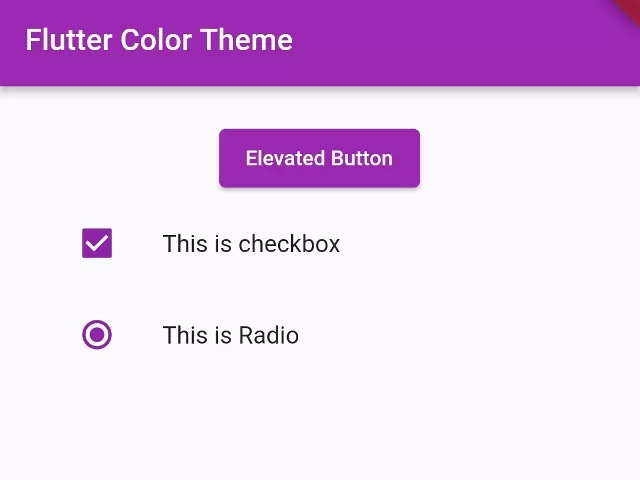
In this example, we are going to show you how to change the default primary theme color of Flutter widget components to any other custom theme color at once by using ThemeData. The default color of the Flutter app is blue color.
How to Change the Default Primary Color of Flutter App.
MaterialApp(
  theme: ThemeData(
      primarySwatch: Colors.purple
  ),
)
You need to pass a ThemeData to the theme parameter of MaterialApp in your Flutter App. You have to pass your own color of choice. You can also set the custom color as the default primary color of your App.
Full App Code Example:
import 'package:flutter/material.dart';

void main(){
  runApp(MyApp());
}

class MyApp extends StatelessWidget{
  @override
  Widget build(BuildContext context) {
    return MaterialApp(
      theme: ThemeData(
         primarySwatch: Colors.purple
      ),
      home: Home(),
    );
  }
}


class Home extends StatefulWidget{
  @override
  _HomeState createState() => _HomeState();
}

class _HomeState extends State<Home> {
  @override
  Widget build(BuildContext context) {

    return  Scaffold(
          appBar: AppBar(
              title: Text("Flutter Color Theme"),
          ),
          body: Container(
            padding: EdgeInsets.all(20),
            alignment: Alignment.center,
             child: Column(
               children:[
                  ElevatedButton(
                     onPressed: (){

                     },
                     child: Text("Elevated Button"),
                  ),

                  ListTile(
                     leading: Checkbox(
                        value: true,
                        onChanged: (value){},
                     ),
                     title:Text("This is checkbox")
                  ),

                  ListTile(
                     leading: Radio(
                        groupValue: true,
                        value: true,
                        onChanged: (value){},
                     ),
                     title:Text("This is Radio")
                  )
               ]
             ),
          )
       );
  }
}
Here, we have set the purple color as the default primary color of the Flutter App using ThemeData. The output of the above code will look like below:
Output Screenshot:

In this way, you can change the default primary theme color fo your Flutter app. To coordinate your app theme with individual widget styling, see how to use setting transparent background colors or implement linear gradient backgrounds on containers.
Updated Flutter Example
Dynamic ColorScheme.fromSeed Theme Architecture in Material 3
Key Implementation Details & Modern Differences:
- Algorithmic Tonal Palettes: Replaces deprecated
ThemeData(primaryColor: ...)andaccentColorwithColorScheme.fromSeed(seedColor: ...), generating an accessible, cohesive 30+ role palette automatically. - Material 3 Enabled by Default: Explicitly configures
useMaterial3: trueto enable contemporary component geometry, elevations, and dynamic surface tinting. - Seamless ThemeMode Toggling: Demonstrates high-performance switching between light and dark palettes derived deterministically from the same brand seed color.
import 'package:flutter/material.dart';

void main() {
  runApp(const ModernThemeColorDemoApp());
}

class ModernThemeColorDemoApp extends StatefulWidget {
  const ModernThemeColorDemoApp({super.key});

  @override
  State<ModernThemeColorDemoApp> createState() =>
      _ModernThemeColorDemoAppState();
}

class _ModernThemeColorDemoAppState extends State<ModernThemeColorDemoApp> {
  Color _seedColor = Colors.deepPurple;
  ThemeMode _themeMode = ThemeMode.light;

  @override
  Widget build(BuildContext context) {
    return MaterialApp(
      title: 'Material 3 Theme Color Demo',
      themeMode: _themeMode,
      theme: ThemeData(
        useMaterial3: true,
        colorScheme: ColorScheme.fromSeed(
          seedColor: _seedColor,
          brightness: Brightness.light,
        ),
      ),
      darkTheme: ThemeData(
        useMaterial3: true,
        colorScheme: ColorScheme.fromSeed(
          seedColor: _seedColor,
          brightness: Brightness.dark,
        ),
      ),
      home: Scaffold(
        appBar: AppBar(
          title: const Text('Dynamic Material 3 ColorScheme'),
          actions: [
            IconButton(
              icon: Icon(
                _themeMode == ThemeMode.light
                    ? Icons.dark_mode
                    : Icons.light_mode,
              ),
              onPressed: () {
                setState(() {
                  _themeMode = _themeMode == ThemeMode.light
                      ? ThemeMode.dark
                      : ThemeMode.light;
                });
              },
            ),
          ],
        ),
        body: Padding(
          padding: const EdgeInsets.all(20.0),
          child: Column(
            crossAxisAlignment: CrossAxisAlignment.start,
            children: [
              Text(
                'Seed Color Palette',
                style: Theme.of(context).textTheme.titleMedium
                    ?.copyWith(fontWeight: FontWeight.bold),
              ),
              const SizedBox(height: 12),
              Wrap(
                spacing: 12,
                children: [
                  FilledButton(
                    onPressed: () =>
                        setState(() => _seedColor = Colors.deepPurple),
                    child: const Text('Purple'),
                  ),
                  FilledButton(
                    onPressed: () => setState(() => _seedColor = Colors.teal),
                    child: const Text('Teal'),
                  ),
                  FilledButton(
                    onPressed: () => setState(() => _seedColor = Colors.orange),
                    child: const Text('Orange'),
                  ),
                ],
              ),
              const SizedBox(height: 24),
              Card(
                child: Padding(
                  padding: const EdgeInsets.all(16.0),
                  child: Text(
                    'Active Seed: ${_seedColor.toARGB32().toRadixString(16).toUpperCase()}',
                    key: const Key('seed-display'),
                  ),
                ),
              ),
            ],
          ),
        ),
      ),
    );
  }
}
Document History & Archival Record
Original reference snapshot archived February 2, 2023. Updated working solution verified on modern Flutter & Dart SDKs.