
How to Show Scrollbar in Flutter
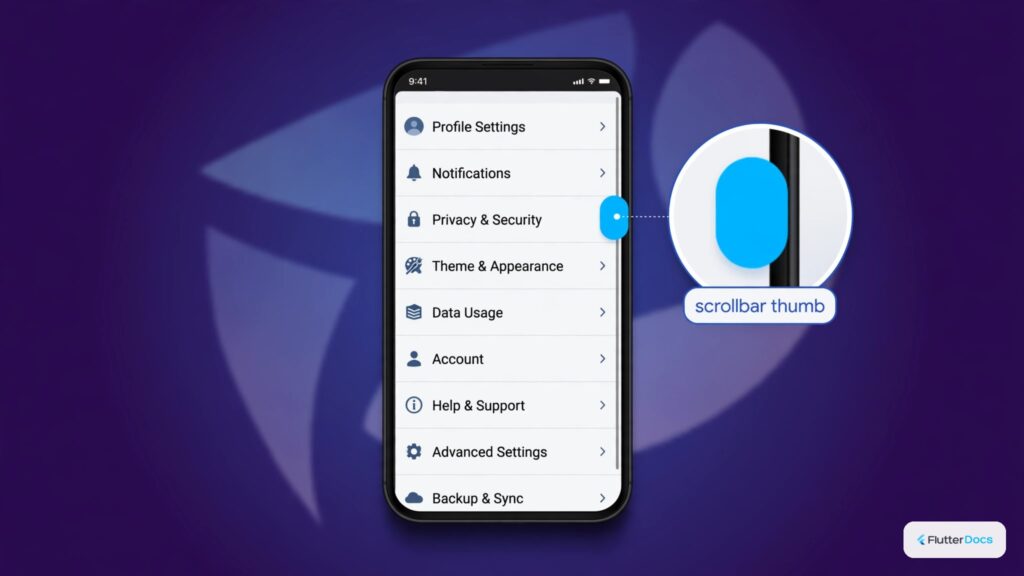
In this example, we are going to show you how to show the scrollbar on SingleChildScrollView and ListView widgets in the Flutter app. The scrollbar is a needy component of Scroll View to show your users the position of scrolling.
How to Show Scrollbar on SingleChildScrollView():
Scrollbar(
        isAlwaysShown: true, //always show scrollbar
        thickness: 10, //width of scrollbar
        radius: Radius.circular(20), //corner radius of scrollbar
        scrollbarOrientation: ScrollbarOrientation.left, //which side to show scrollbar
        child:SingleChildScrollView()
)
You should wrap SingleChildScrollView with Scrollbar to show a scrollbar, you can configure the location, widget of the scrollbar.
How to Show Scrollbar on ListView():
Scrollbar(
    isAlwaysShown: true, //always show scrollbar
    thickness: 10, //width of scrollbar
    radius: Radius.circular(20), //corner radius of scrollbar
    scrollbarOrientation: ScrollbarOrientation.left, //which side to show scrollbar
    child:ListView()
)
Wrap ListView() widget with Scrollbar() widget to show scrollbar on ListView in Flutter App.
Read this also: How to Get Scroll Position Offset in Flutter
Flutter App Example:
import 'package:flutter/material.dart';

void main() {
  runApp(MyApp());
}

class MyApp extends StatelessWidget{
  @override
  Widget build(BuildContext context) {
     return MaterialApp(
         home: Home()
      );
  }
}

class Home extends  StatefulWidget {
  @override
  State<Home> createState() => _HomeState();
}

class _HomeState extends State<Home> {
  @override
  Widget build(BuildContext context) {

    List<String> countries = ["USA", "United Kingdom", "China", "Russia", "Brazil",
                              "India", "Pakistan", "Nepal", "Bangladesh", "Sri Lanka",
                              "Japan", "South Korea", "Mongolia"];

    return Scaffold(
         appBar: AppBar(
            title: Text("Show Scrollbar in Flutter"),
            backgroundColor: Colors.redAccent
         ),
          body: Container(
            alignment: Alignment.center,
            padding: EdgeInsets.all(20),
             child: Scrollbar(
                  isAlwaysShown: true, //always show scrollbar
                  thickness: 10, //width of scrollbar
                  radius: Radius.circular(20), //corner radius of scrollbar
                  scrollbarOrientation: ScrollbarOrientation.left, //which side to show scrollbar
                  child:ListView(
                    children: countries.map((country){
                        return Card(
                          child:ListTile(
                              title: Text(country)
                          )
                        );
                    }).toList(),
                )
              )
          )
    );
  }
}
Output Screenshot:

In this way, you can show scrollbar on scrolling widgets like SingleChildScrollView and ListView in Flutter App. To control scrollbar visibility across custom lists, explore horizontal ListView scrolling and adding scroll back to top buttons.
Updated Flutter Example
Scrollbar Dual Controller Binding & Thumb Visibility
Key Implementation Details & Modern Differences:
- Dual Controller Architecture: Attaches the same
ScrollControllerinstance to bothScrollbarandListView.builder, resolving the critical Flutter 3+ assertion crash. - Interactive Persistent Thumb: Enables
thumbVisibility: trueandinteractive: truefor intuitive desktop and web scroll interaction. - Resource Management: Demonstrates proper
ScrollController.dispose()lifecycle handling to prevent memory leaks.
import 'package:flutter/material.dart';

void main() {
  runApp(const MaterialApp(home: ModernScrollbarDemo()));
}

class ModernScrollbarDemo extends StatefulWidget {
  const ModernScrollbarDemo({super.key});

  @override
  State<ModernScrollbarDemo> createState() => _ModernScrollbarDemoState();
}

class _ModernScrollbarDemoState extends State<ModernScrollbarDemo> {
  final ScrollController _scrollController = ScrollController();

  @override
  void dispose() {
    _scrollController.dispose();
    super.dispose();
  }

  @override
  Widget build(BuildContext context) {
    return Scaffold(
      appBar: AppBar(
        title: const Text('Scrollbar Dual Controller Binding'),
      ),
      // SOLUTION: Pass the identical ScrollController to both
      // Scrollbar and ListView to prevent position detachment errors.
      body: Scrollbar(
        controller: _scrollController,
        thumbVisibility: true,
        interactive: true,
        thickness: 8.0,
        radius: const Radius.circular(4),
        child: ListView.builder(
          controller: _scrollController,
          itemCount: 40,
          itemBuilder: (context, index) {
            return ListTile(
              leading: CircleAvatar(child: Text('${index + 1}')),
              title: Text('Documentation Topic #${index + 1}'),
              subtitle: const Text('Verified against Flutter 3.47.7'),
            );
          },
        ),
      ),
    );
  }
}
Document History & Archival Record
Original reference snapshot archived January 4, 2023. Updated working solution verified on modern Flutter & Dart SDKs.