
How to add Horizontal and Vertical Divider on Flutter
Verified Solution
Tested on Flutter 3.47.7 • Dart 3.13.5
Jump to Updated Flutter Example ↓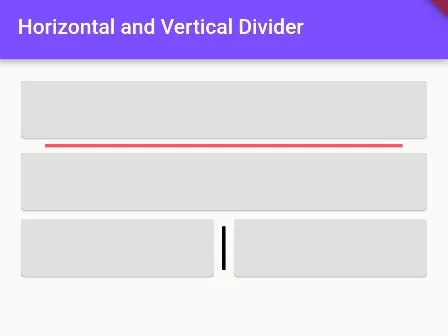
In this example, we are going to show you the easiest way to add a horizontal or vertical divider, change its color, thickness, and width in the Flutter app. See the example below:
How to Add Horizontal Divider:
Divider(
    color: Colors.redAccent, //color of divider
    height: 5, //height spacing of divider
    thickness: 3, //thickness of divier line
    indent: 25, //spacing at the start of divider
    endIndent: 25, //spacing at the end of divider
)
How to Add Vertical Divider:
VerticalDivider(
  color: Colors.black,  //color of divider
  width: 10, //width space of divider
  thickness: 3, //thickness of divier line
  indent: 10, //Spacing at the top of divider.
  endIndent: 10, //Spacing at the bottom of divider.
)
Full Code Example:
import 'package:flutter/material.dart';

void main() {
  runApp(
    MaterialApp( home: MyApp(),)
  );
}

class MyApp extends StatefulWidget{
  @override
  State<MyApp> createState() => _MyAppState();
}

class _MyAppState extends State<MyApp> {
  @override
  Widget build(BuildContext context) {
    return Scaffold(
          appBar: AppBar(
              title:Text("Horizontal and Vertical Divider"),
              backgroundColor: Colors.deepPurpleAccent
          ),
          body: Container(
            padding: EdgeInsets.all(15),
             child: Column(children: [

                    Card(
                      child: Container(
                          height: 50,
                          color: Colors.black12,
                      ),
                    ),

                    Divider(
                       color: Colors.redAccent, //color of divider
                       height: 5, //height spacing of divider
                       thickness: 3, //thickness of divier line
                       indent: 25, //spacing at the start of divider
                       endIndent: 25, //spacing at the end of divider
                    ),

                    Card(
                      child: Container(
                          height: 50,
                          color: Colors.black12,
                      ),
                    ),

                    IntrinsicHeight( //wrap Row with this, otherwise, vertical divider will not display
                      child:Row(
                       children: [
                            Expanded(
                              child:Card(
                                  child: Container(
                                      height: 50,
                                      color: Colors.black12,
                                  ),
                                ),
                            ),


                            VerticalDivider(
                              color: Colors.black,  //color of divider
                              width: 10, //width space of divider
                              thickness: 3, //thickness of divier line
                              indent: 10, //Spacing at the top of divider.
                              endIndent: 10, //Spacing at the bottom of divider.
                            ),


                            Expanded(
                              child:Card(
                                child: Container(
                                    height: 50,
                                    color: Colors.black12,
                                ),
                              ),
                            )
                       ],
                    )
                  )


             ],)
          )
      );
  }
}
If Vertical Divider is not displaying, then see this:\u00a0How to Fix Vertical Divider Not Showing in Flutter App
Output Screenshot:

In this way, you can add Vertical and Horizontal divider widgets in Flutter App. If vertical dividers fail to render, consult our troubleshooting guide on fixing vertical divider unbounded height errors and adjusting padding and margins on widgets.
Updated Flutter Example
Updated Flutter Example
Modern Dividers & Layout Spacers with IntrinsicHeight
Key Implementation Details & Modern Differences:
- IntrinsicHeight Scope for Vertical Dividers: Embeds
VerticalDividerwithin anIntrinsicHeight-wrappedRow, preventing invisible zero-height layout collapses. - Material 3 DividerTheme Integration: Standardizes divider thicknesses, indents, and outline variant theme colors across section boundaries.
- Declarative Spacing: Replaces deprecated spacer hacks with clean, semantic Material 3 divider structures.
Updated Flutter Example Code
import 'package:flutter/material.dart';

void main() {
  runApp(const MaterialApp(home: ModernDividersDemo()));
}

class ModernDividersDemo extends StatelessWidget {
  const ModernDividersDemo({super.key});

  @override
  Widget build(BuildContext context) {
    final theme = Theme.of(context);

    return Scaffold(
      appBar: AppBar(
        title: const Text('Modern Dividers & Layout Spacers'),
      ),
      body: Padding(
        padding: const EdgeInsets.all(16.0),
        child: Column(
          crossAxisAlignment: CrossAxisAlignment.stretch,
          children: [
            Text(
              'Horizontal Dividers',
              style: theme.textTheme.titleMedium,
            ),
            const SizedBox(height: 8),
            const Text('Section 1: User Profile Settings'),
            const Divider(
              height: 24,
              thickness: 1.5,
              indent: 16,
              endIndent: 16,
            ),
            const Text('Section 2: Security & Authentication'),
            const Divider(
              height: 24,
              thickness: 1.5,
              indent: 16,
              endIndent: 16,
            ),
            const SizedBox(height: 16),
            Text(
              'Vertical Divider inside IntrinsicHeight Row',
              style: theme.textTheme.titleMedium,
            ),
            const SizedBox(height: 8),
            // SOLUTION: IntrinsicHeight gives bounded height to the Row,
            // allowing VerticalDivider to calculate its vertical extent.
            IntrinsicHeight(
              child: Row(
                children: [
                  Expanded(
                    child: Column(
                      children: [
                        Text('Followers', style: theme.textTheme.bodySmall),
                        Text('1,420', style: theme.textTheme.titleLarge),
                      ],
                    ),
                  ),
                  const VerticalDivider(
                    width: 24,
                    thickness: 1.5,
                    indent: 8,
                    endIndent: 8,
                  ),
                  Expanded(
                    child: Column(
                      children: [
                        Text('Following', style: theme.textTheme.bodySmall),
                        Text('385', style: theme.textTheme.titleLarge),
                      ],
                    ),
                  ),
                  const VerticalDivider(
                    width: 24,
                    thickness: 1.5,
                    indent: 8,
                    endIndent: 8,
                  ),
                  Expanded(
                    child: Column(
                      children: [
                        Text('Projects', style: theme.textTheme.bodySmall),
                        Text('42', style: theme.textTheme.titleLarge),
                      ],
                    ),
                  ),
                ],
              ),
            ),
          ],
        ),
      ),
    );
  }
}
Document History & Archival Record
Original reference snapshot archived February 2, 2023. Updated working solution verified on modern Flutter & Dart SDKs.