
How to Unique Array List in Dart/Flutter
Verified Solution
Tested on Flutter 3.47.7 • Dart 3.13.5
Jump to Updated Flutter Example ↓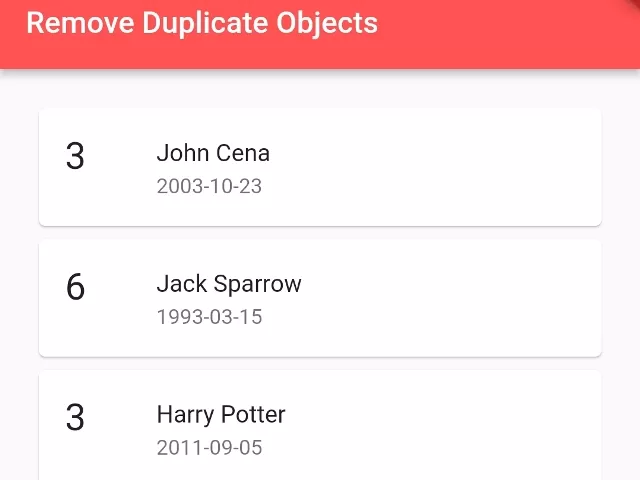
In this example, we are going to show you how to remove duplicates from an array List of objects by matching it property value in Dare or Flutter. See the example below:
Object Model Class:
class Student{
   String name, dob;
   int rollno;

   Student({
       required this.name,
       required this.rollno,
       required this.dob
   });
}
List of Objects:
List<Student> students = [
    Student(name: "John Cena", rollno: 3, dob: "2003-10-23"),
    Student(name: "John Cena", rollno: 4, dob: "2005-01-13"),
    Student(name: "Jack Sparrow", rollno: 6, dob: "1993-03-15"),
    Student(name: "Harry Potter", rollno: 3, dob: "2011-09-05"),
    Student(name: "Jack Sparrow", rollno: 4, dob: "1993-05-11"),
];
How to Make List of Object Unique by String Property Value:
var seen = Set<String>();
List<Student> uniquelist = students.where((student) => seen.add(student.name)).toList();
//output list: John Cena, Jack Sparrow, Harry Potter
How to Make List of Object Unique by Integer Property Value:
var seen = Set<String>();
List<Student> uniquelist = students.where((student) => seen.add(student.rollno.toString())).toList();
//output: John Centa (3), John Cena (4), Jack Sparrow (6)
Full Flutter/Dart Example:
import 'package:flutter/material.dart';

void main() {
  runApp( MaterialApp(
       home: Home()
  ));
}

class Home extends  StatefulWidget {
  @override
  State<Home> createState() => _HomeState();
}

class _HomeState extends State<Home> {

  @override
  Widget build(BuildContext context) {

    List<Student> students = [
        Student(name: "John Cena", rollno: 3, dob: "2003-10-23"),
        Student(name: "John Cena", rollno: 4, dob: "2005-01-13"),
        Student(name: "Jack Sparrow", rollno: 6, dob: "1993-03-15"),
        Student(name: "Harry Potter", rollno: 3, dob: "2011-09-05"),
        Student(name: "Jack Sparrow", rollno: 4, dob: "1993-05-11"),
    ];

    var seen = Set<String>();
    List<Student> uniquelist = students.where((student) => seen.add(student.name)).toList();
    //output list: John Cena, Jack Sparrow, Harry Potter

    return Scaffold(
         appBar: AppBar(
            title: Text("Remove Duplicate Objects"),
            backgroundColor: Colors.redAccent,
         ),
          body: Container(
             alignment: Alignment.center,
             padding: EdgeInsets.all(20),
             child: Column(
               children:uniquelist.map((studentone){
                  return Container(
                    child: Card(
                       child:ListTile(
                          leading: Text(studentone.rollno.toString(),
                                    style: TextStyle(fontSize: 25),),
                          title: Text(studentone.name),
                          subtitle: Text(studentone.dob),
                       )
                    )
                  );
               }).toList(),
             ),
          )
      );
  }
}

class Student{
   String name, dob;
   int rollno;

   Student({
       required this.name,
       required this.rollno,
       required this.dob
   });
}
Output Screenshot:

In this way, you can remove duplicate objects by matching their property value to make a unique list of objects in Flutter/Dart. For foundational collection handling, see our guide on array list fundamentals in Dart and sorting lists by date.
Updated Flutter Example
Updated Flutter Example
Collection Deduplication & Set Conversion
Key Implementation Details & Modern Differences:
- Idiomatic Set Deduplication: Uses
list.toSet().toList()for high-performance O(N) deduplication of primitive collections. - Custom Object Equality: Demonstrates property-based equality filtering using
seenIds.add(item.id)for complex entity collections without modifying hash codes. - Interactive Real-Time Filtering: Provides interactive before-and-after views showing duplicate count reduction.
Updated Flutter Example Code
import 'package:flutter/material.dart';

void main() {
  runApp(const MaterialApp(home: ModernCollectionDeduplicationDemo()));
}

/// Deduplication utilities for Dart 3 collections.
class CollectionDeduplicator {
  /// Deduplicates primitive lists while preserving first-seen order.
  static List<T> uniquePrimitives<T>(List<T> list) {
    return list.toSet().toList();
  }

  /// Deduplicates entity objects by a unique property selector.
  static List<T> uniqueBy<T, K>(List<T> list, K Function(T) keySelector) {
    final seen = <K>{};
    return list.where((item) => seen.add(keySelector(item))).toList();
  }
}

class ProductItem {
  final int id;
  final String title;

  const ProductItem(this.id, this.title);
}

class ModernCollectionDeduplicationDemo extends StatefulWidget {
  const ModernCollectionDeduplicationDemo({super.key});

  @override
  State<ModernCollectionDeduplicationDemo> createState() =>
      _ModernCollectionDeduplicationDemoState();
}

class _ModernCollectionDeduplicationDemoState
    extends State<ModernCollectionDeduplicationDemo> {
  final List<String> _rawTags = [
    'flutter',
    'dart',
    'flutter',
    'ui',
    'dart',
    'widget',
  ];
  bool _isDeduplicated = false;

  @override
  Widget build(BuildContext context) {
    final theme = Theme.of(context);
    final displayedTags = _isDeduplicated
        ? CollectionDeduplicator.uniquePrimitives(_rawTags)
        : _rawTags;

    return Scaffold(
      appBar: AppBar(title: const Text('Collection Deduplication in Dart 3')),
      body: Padding(
        padding: const EdgeInsets.all(20.0),
        child: Column(
          crossAxisAlignment: CrossAxisAlignment.start,
          children: [
            Text(
              'Raw Collection Count: ${_rawTags.length} items',
              style: theme.textTheme.titleMedium,
            ),
            const SizedBox(height: 12),
            Wrap(
              spacing: 8,
              runSpacing: 8,
              children: displayedTags
                  .map(
                    (t) => Chip(
                      label: Text(t),
                      backgroundColor: theme.colorScheme.primaryContainer,
                    ),
                  )
                  .toList(),
            ),
            const SizedBox(height: 24),
            Row(
              children: [
                FilledButton.tonal(
                  onPressed: () =>
                      setState(() => _isDeduplicated = !_isDeduplicated),
                  child: Text(
                    _isDeduplicated ? 'Show Raw' : 'Deduplicate with Set',
                  ),
                ),
              ],
            ),
            const SizedBox(height: 12),
            Text(
              'Status: ${_isDeduplicated ? "Deduplicated (${displayedTags.length} unique items)" : "Raw (${displayedTags.length} items with duplicates)"}',
              key: const Key('dedup-status-text'),
              style: const TextStyle(fontWeight: FontWeight.bold),
            ),
            const Divider(height: 36),
            Text(
              'Modern Architecture: For primitive types, list.toSet().toList() is O(N) '
              'and idiomatic. For custom classes, filter using a Set of keys: '
              'list.where((item) => seen.add(item.id)).toList().',
              style: theme.textTheme.bodySmall?.copyWith(
                color: Colors.grey[700],
              ),
            ),
          ],
        ),
      ),
    );
  }
}
Document History & Archival Record
Original reference snapshot archived November 22, 2021. Updated working solution verified on modern Flutter & Dart SDKs.