
How to set Box Shadow on Container Widget in Flutter
Verified Solution
Tested on Flutter 3.47.7 • Dart 3.13.5
Jump to Updated Flutter Example ↓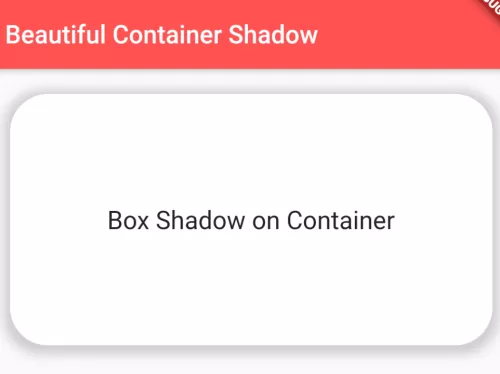
The beautiful UI of the app is the key to make a good impression with users. While making beautiful UI, the box-shadow property is very important during designing. See the example below and learn how to apply a box-shadow on the Container widget of Flutter.
To apply box shadow, use the following code:
BoxShadow(
   color: Colors.grey.withOpacity(0.5), //color of shadow
   spreadRadius: 5, //spread radius
   blurRadius: 7, // blur radius
   offset: Offset(0, 2), // changes position of shadow
   //first paramerter of offset is left-right
   //second parameter is top to down
)
Full dart code:
import 'package:flutter/material.dart';
import 'package:flutter/widgets.dart';

class ContainerStyle extends StatelessWidget{
  @override
  Widget build(BuildContext context) {
    return Scaffold(
        appBar: AppBar(
         title: Text("Beautiful Container Shadow"),
         backgroundColor: Colors.redAccent,
       ),
       body:Container(
          alignment: Alignment.center,
          margin: EdgeInsets.all(20),
          height: 200,
          width:double.infinity,
          decoration: BoxDecoration(
            color: Colors.white,
             borderRadius: BorderRadius.circular(30), //border corner radius
             boxShadow:[
               BoxShadow(
                  color: Colors.grey.withOpacity(0.5), //color of shadow
                  spreadRadius: 5, //spread radius
                  blurRadius: 7, // blur radius
                  offset: Offset(0, 2), // changes position of shadow
                  //first paramerter of offset is left-right
                  //second parameter is top to down
               ),
               //you can set more BoxShadow() here
              ],
          ),
          child:Text("Box Shadow on Container", style: TextStyle(
            fontSize:20,
          ),),
       ),
    );
  }
}
Output:

In this way, you can apply box shadow on Container() widget in Flutter. To combine elevation shadows with custom boundaries, review dotted and dash borders on containers and linear gradient backgrounds on containers.
Updated Flutter Example
Updated Flutter Example
BoxShadow Layering & Elevation Tint Architecture
Key Implementation Details & Modern Differences:
- Multi-Layered Shadow Composition: Employs key and ambient shadow pairs for natural, physically realistic elevation depth.
- Spread and Blur Radius Calibration: Balances
spreadRadiusandblurRadiusto prevent harsh artificial outlines. - Material 3 Elevation Tint Integration: Pairs custom box shadows with surface elevation tints for seamless design system integration.
Updated Flutter Example Code
import 'package:flutter/material.dart';

void main() {
  runApp(const MaterialApp(home: ModernBoxShadowDemo()));
}

class ModernBoxShadowDemo extends StatefulWidget {
  const ModernBoxShadowDemo({super.key});

  @override
  State<ModernBoxShadowDemo> createState() => _ModernBoxShadowDemoState();
}

class _ModernBoxShadowDemoState extends State<ModernBoxShadowDemo> {
  int _elevationLevel = 2;

  List<BoxShadow> _computeShadows(int level) {
    switch (level) {
      case 1:
        return const [
          BoxShadow(
            color: Color(0x1A000000),
            offset: Offset(0, 1),
            blurRadius: 3,
            spreadRadius: 0,
          ),
        ];
      case 2:
        return const [
          BoxShadow(
            color: Color(0x1F000000),
            offset: Offset(0, 3),
            blurRadius: 6,
            spreadRadius: 0,
          ),
          BoxShadow(
            color: Color(0x0F000000),
            offset: Offset(0, 2),
            blurRadius: 4,
            spreadRadius: -1,
          ),
        ];
      case 3:
      default:
        return const [
          BoxShadow(
            color: Color(0x24000000),
            offset: Offset(0, 10),
            blurRadius: 20,
            spreadRadius: -3,
          ),
          BoxShadow(
            color: Color(0x14000000),
            offset: Offset(0, 4),
            blurRadius: 6,
            spreadRadius: -2,
          ),
        ];
    }
  }

  @override
  Widget build(BuildContext context) {
    final theme = Theme.of(context);

    return Scaffold(
      appBar: AppBar(title: const Text('BoxShadow Layering Architecture')),
      body: Padding(
        padding: const EdgeInsets.all(24.0),
        child: Column(
          crossAxisAlignment: CrossAxisAlignment.start,
          children: [
            Text('Select Elevation Level:', style: theme.textTheme.titleMedium),
            const SizedBox(height: 12),
            SegmentedButton<int>(
              segments: const [
                ButtonSegment(value: 1, label: Text('Low (1)')),
                ButtonSegment(value: 2, label: Text('Medium (2)')),
                ButtonSegment(value: 3, label: Text('Floating (3)')),
              ],
              selected: {_elevationLevel},
              onSelectionChanged: (val) =>
                  setState(() => _elevationLevel = val.first),
            ),
            const SizedBox(height: 36),
            Center(
              child: Container(
                width: 220,
                height: 120,
                decoration: BoxDecoration(
                  color: theme.colorScheme.surface,
                  borderRadius: BorderRadius.circular(16),
                  boxShadow: _computeShadows(_elevationLevel),
                ),
                alignment: Alignment.center,
                child: Text(
                  'Elevation Level: $_elevationLevel',
                  key: const Key('elevation-text'),
                  style: theme.textTheme.titleMedium?.copyWith(
                    fontWeight: FontWeight.bold,
                  ),
                ),
              ),
            ),
            const Divider(height: 48),
            Text(
              'Modern Architecture: Realistic depth requires multi-layered BoxShadows: '
              'a diffuse ambient shadow with negative spread, paired with a directional key shadow. '
              'This mimics physical light and avoids muddy single-shadow halos.',
              style: theme.textTheme.bodySmall?.copyWith(
                color: Colors.grey[700],
              ),
            ),
          ],
        ),
      ),
    );
  }
}
Document History & Archival Record
Original reference snapshot archived April 1, 2023. Updated working solution verified on modern Flutter & Dart SDKs.