
How to Set Margin Inside Elevated Button in Flutter
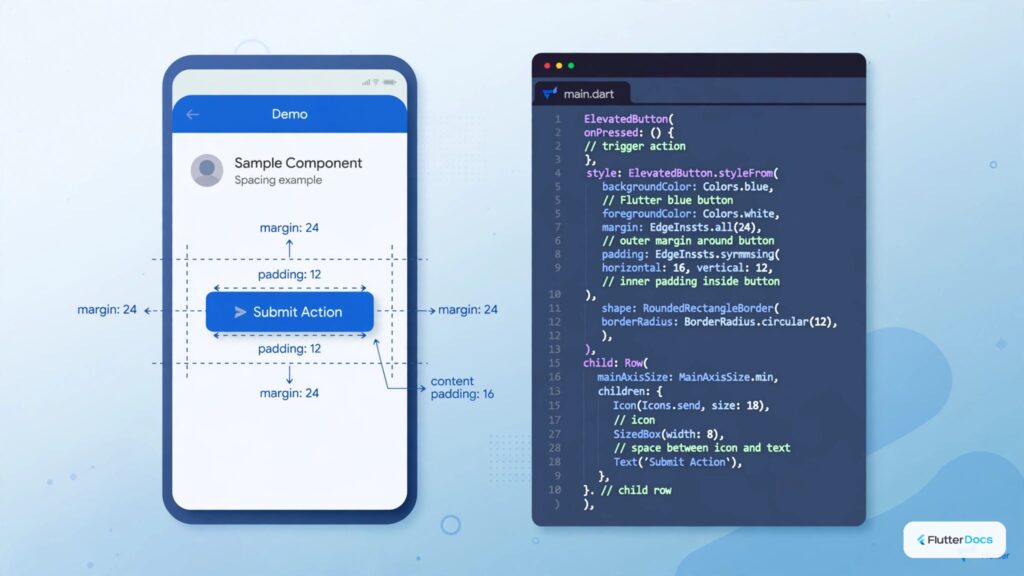
In this post, we are going to show you how to set or change internal margin or padding on ElevatedButton. By default, the internal margin on content is pre-defined, you may need this method to reduce or increase the padding inside Elevated Button.
How to set Margin/Padding on ElevatedButton Child:
ElevatedButton(
  style: ElevatedButton.styleFrom(
      padding: EdgeInsets.all(50)
      //internal content margin
  )
)
You can define padding value using the above method on ElevatedButton. Alternatively, you can use padding factors on the Child widget.
ElevatedButton(
  child: Padding(
      padding: EdgeInsets.all(30),
      child:Text("My Elevated Button 1")
  )
)
But, with this method, you cannot able to change the default padding value of the Elevated Button.
Full Code Example:
import 'package:flutter/material.dart';

void main(){
  runApp(MyApp());
}

class MyApp extends StatelessWidget{
  @override
  Widget build(BuildContext context) {
    return MaterialApp(
      home: Home(),
    );
  }
}

class Home extends StatefulWidget{
  @override
  _HomeState createState() => _HomeState();
}

class _HomeState extends State<Home> {
  @override
  Widget build(BuildContext context) {
    return  Scaffold(
          appBar: AppBar(
            title: Text("ElevatedButton Margin/Padding"),
            backgroundColor: Colors.redAccent,
          ),
          body: Container(
            padding: EdgeInsets.only(top:20, left:20, right:20),
            child: Wrap(
                alignment: WrapAlignment.start,
                children: [

                ElevatedButton(
                  style: ElevatedButton.styleFrom(
                      padding: EdgeInsets.all(50)
                      //internal content margin
                  ),
                  onPressed: (){

                  },
                  child: Text("My Elevated Button")
                ),

                Divider(),

                ElevatedButton(
                  onPressed: (){

                  },
                  child: Padding(
                      padding: EdgeInsets.all(30),
                      child:Text("My Elevated Button 1")
                  )
                )

            ],)
          )
       );
  }
}
Output Screenshot:

In this way, you can set or change the internal margin of ElevatedButton in Flutter. To customize button dimensions and borders, explore styling ElevatedButtons and creating circular ElevatedButtons.
Updated Flutter Example
Button Internal Padding & Margin Architecture
Key Implementation Details & Modern Differences:
- ButtonStyle.padding: Uses official Material 3 button padding APIs instead of legacy margin parameters.
- Touch Target Compliance: Guarantees minimum 48x48 dp touch target dimensions for mobile accessibility.
- Visual Spacing Discrimination: Clarifies exact architectural differences between inner padding and outer margins.
import 'package:flutter/material.dart';

void main() {
  runApp(const MaterialApp(home: ModernButtonPaddingDemo()));
}

class ModernButtonPaddingDemo extends StatefulWidget {
  const ModernButtonPaddingDemo({super.key});

  @override
  State<ModernButtonPaddingDemo> createState() =>
      _ModernButtonPaddingDemoState();
}

class _ModernButtonPaddingDemoState extends State<ModernButtonPaddingDemo> {
  double _horizontalPadding = 32.0;
  double _verticalPadding = 16.0;

  @override
  Widget build(BuildContext context) {
    final theme = Theme.of(context);

    return Scaffold(
      appBar: AppBar(title: const Text('Button Internal Padding & Margins')),
      body: SingleChildScrollView(
        padding: const EdgeInsets.all(24.0),
        child: Column(
          crossAxisAlignment: CrossAxisAlignment.stretch,
          children: [
            Center(
              child: ElevatedButton.icon(
                key: const Key('custom-padded-button'),
                icon: const Icon(Icons.touch_app),
                label: const Text('Padded Button'),
                style: ElevatedButton.styleFrom(
                  padding: EdgeInsets.symmetric(
                    horizontal: _horizontalPadding,
                    vertical: _verticalPadding,
                  ),
                  minimumSize: const Size(
                    48,
                    48,
                  ), // Material 3 accessible touch target
                  shape: RoundedRectangleBorder(
                    borderRadius: BorderRadius.circular(16),
                  ),
                ),
                onPressed: () {},
              ),
            ),
            const SizedBox(height: 32),
            Text('Horizontal Padding: ${_horizontalPadding.toInt()} dp'),
            Slider(
              min: 12.0,
              max: 64.0,
              value: _horizontalPadding,
              onChanged: (val) => setState(() => _horizontalPadding = val),
            ),
            const SizedBox(height: 16),
            Text('Vertical Padding: ${_verticalPadding.toInt()} dp'),
            Slider(
              min: 8.0,
              max: 32.0,
              value: _verticalPadding,
              onChanged: (val) => setState(() => _verticalPadding = val),
            ),
            const SizedBox(height: 24),
            Card(
              color: theme.colorScheme.surfaceContainerHighest,
              child: const Padding(
                padding: EdgeInsets.all(16.0),
                child: Column(
                  crossAxisAlignment: CrossAxisAlignment.start,
                  children: [
                    Text(
                      'Padding vs Margin Architecture:',
                      style: TextStyle(fontWeight: FontWeight.bold),
                    ),
                    SizedBox(height: 8),
                    Text(
                      '• Internal spacing: configured via ButtonStyle.padding / ElevatedButton.styleFrom(padding: ...).\n'
                      '• External margin: achieved by wrapping button in Padding(...) or Container(margin: ...).\n'
                      '• Always maintain at least 48x48 dp touch target size for mobile accessibility.',
                    ),
                  ],
                ),
              ),
            ),
          ],
        ),
      ),
    );
  }
}
Document History & Archival Record
Original reference snapshot archived April 1, 2023. Updated working solution verified on modern Flutter & Dart SDKs.