
How to Remove Special Characters from String in Dart/Flutter
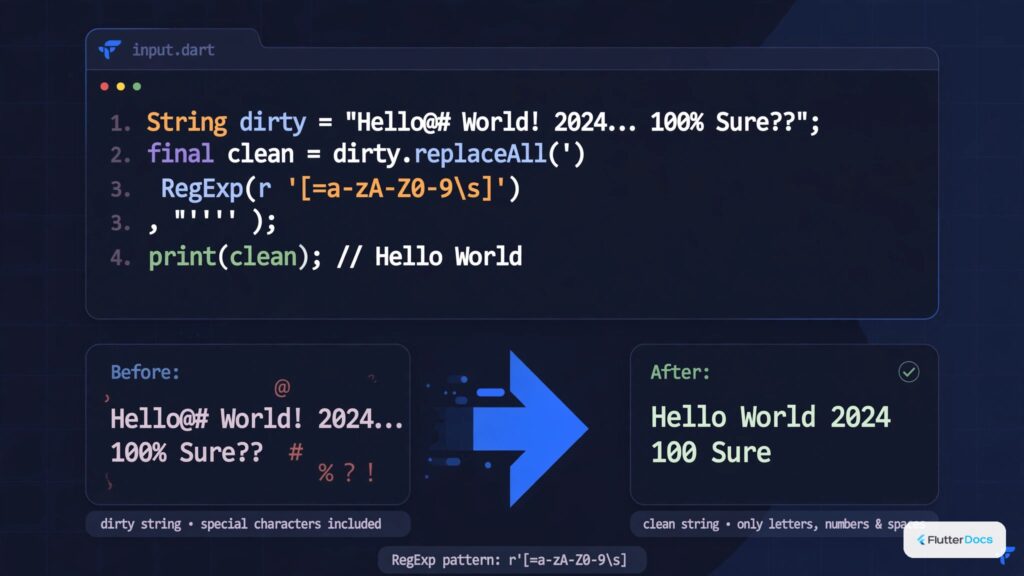
In this post, we are going to show how to extract alphabets or numbers only from String by removing special characters. We will use RegEx expression to remove special characters from String in Dart or Flutter.
How to Remove Special Characters and Get Alphabets and Numbers?
String str = "#@F&L^&%U##T#[email protected]#ER###[email protected]#@M*([email protected]&#S%^%[email protected]*(^&";
String result = str.replaceAll(RegExp('[^A-Za-z0-9]'), '');
print(result); //Output: FLUTTERCAMPUS2324
Here, we have string “str” with special characters, alphabets, numbers. We have used the replaceAll() method on string with RegEx expression to remove the special characters. It will give you the alphabets and numbers both and Special characters will be removed.
How to Remove Special Characters and Get Alphabets only?
String str1 = "#@F&L^&%U##T#[email protected]#ER###[email protected]#@M*([email protected]&#S%^%[email protected]*(^&";
String result1 = str1.replaceAll(RegExp('[^A-Za-z]'), '');
print(result1); //Output (Allphabets Only): FLUTTERCAMPUS
Here, we used RegEx expression and the replaceAll method to remove social characters, numbers and only get the alphabets. You can also modify the RegEx expression to get capital or small letter only alphabets in Dart or Flutter.
How to Remove Special Characters and Get numbers only?
String str2 = "#@F&L^&%U##T#[email protected]#ER###[email protected]#@M*([email protected]&#S%^%[email protected]*(^&";
String result2 = str2.replaceAll(RegExp('[^0-9]'), '');
print(result2); //Output (Numbers Only): 2324
This code will give you only numbers by removing alphabets and special characters from String in Dart or Flutter.
How to Replace Special Characters with other Characters?
String str3 = "#@F&L^&%U##T#[email protected]#ER###[email protected]#@M*([email protected]&#S%^%[email protected]*(^&";
String result3 = str3.replaceAll(RegExp('[^A-Za-z0-9]'), '.');
print(result3);
//Output: ..F.L...U..T.T..ER...CA...M..PU...S...2324.....
You can use the above code to replace special characters with any other characters, you can replace ‘.’ with your own characters.
In this way, you can remove Special characters from String in Dart or Flutter. For other text sanitization techniques in Dart, explore how to remove HTML tags from strings or convert strings to integers or doubles.
Updated Flutter Example
Regex String Sanitization & Normalization
Key Implementation Details & Modern Differences:
- Character-Class Whitelisting: Uses standard
RegExp(r'[^a-zA-Z0-9\s]')to strip punctuation and non-alphanumeric symbols safely. - URL Slug Generation: Incorporates robust slugification with whitespace normalization and lowercase conversion.
- Live Input Preview: Features interactive text input with real-time sanitized output cards.
import 'package:flutter/material.dart';

void main() {
  runApp(const MaterialApp(home: ModernStringSanitizerDemo()));
}

/// Production utility for regex-based string sanitization and slugification.
class StringSanitizer {
  /// Removes all characters except alphanumeric and optional whitespace.
  static String removeSpecialCharacters(
    String input, {
    bool keepWhitespace = true,
  }) {
    if (input.isEmpty) return '';
    final pattern = keepWhitespace
        ? RegExp(r'[^a-zA-Z0-9\s]')
        : RegExp(r'[^a-zA-Z0-9]');
    return input.replaceAll(pattern, '');
  }

  /// Converts an arbitrary string into a URL-friendly lowercase slug.
  static String toSlug(String input) {
    if (input.isEmpty) return '';
    // 1. Remove special characters keeping spaces
    final clean = input.replaceAll(RegExp(r'[^a-zA-Z0-9\s-]'), '');
    // 2. Collapse multiple whitespace/hyphens into single hyphen
    final normalized = clean.trim().replaceAll(RegExp(r'[\s-]+'), '-');
    return normalized.toLowerCase();
  }

  /// Collapses redundant consecutive whitespace into a single space.
  static String normalizeWhitespace(String input) {
    return input.replaceAll(RegExp(r'\s+'), ' ').trim();
  }
}

class ModernStringSanitizerDemo extends StatefulWidget {
  const ModernStringSanitizerDemo({super.key});

  @override
  State<ModernStringSanitizerDemo> createState() =>
      _ModernStringSanitizerDemoState();
}

class _ModernStringSanitizerDemoState extends State<ModernStringSanitizerDemo> {
  final TextEditingController _controller = TextEditingController(
    text: 'Hello @Flutter# 3.47! Clean & Modern <Code>?',
  );

  @override
  void dispose() {
    _controller.dispose();
    super.dispose();
  }

  @override
  Widget build(BuildContext context) {
    final theme = Theme.of(context);
    final rawText = _controller.text;
    final sanitized = StringSanitizer.removeSpecialCharacters(rawText);
    final slug = StringSanitizer.toSlug(rawText);

    return Scaffold(
      appBar: AppBar(title: const Text('String Sanitization & Regex')),
      body: SingleChildScrollView(
        padding: const EdgeInsets.all(20.0),
        child: Column(
          crossAxisAlignment: CrossAxisAlignment.stretch,
          children: [
            TextField(
              controller: _controller,
              decoration: const InputDecoration(
                labelText: 'Raw Input Text',
                border: OutlineInputBorder(),
              ),
              onChanged: (_) => setState(() {}),
            ),
            const SizedBox(height: 20),
            Card(
              elevation: 0,
              color: theme.colorScheme.surfaceContainerHighest,
              shape: RoundedRectangleBorder(
                borderRadius: BorderRadius.circular(16),
              ),
              child: Padding(
                padding: const EdgeInsets.all(16.0),
                child: Column(
                  crossAxisAlignment: CrossAxisAlignment.start,
                  children: [
                    Text(
                      'Sanitized Alphanumeric:',
                      style: theme.textTheme.labelMedium?.copyWith(
                        color: theme.colorScheme.primary,
                        fontWeight: FontWeight.bold,
                      ),
                    ),
                    const SizedBox(height: 6),
                    Text(
                      sanitized,
                      key: const Key('sanitized-output-text'),
                      style: theme.textTheme.bodyLarge?.copyWith(
                        fontWeight: FontWeight.w600,
                      ),
                    ),
                    const Divider(height: 24),
                    Text(
                      'Generated URL Slug:',
                      style: theme.textTheme.labelMedium?.copyWith(
                        color: theme.colorScheme.primary,
                        fontWeight: FontWeight.bold,
                      ),
                    ),
                    const SizedBox(height: 6),
                    Text(
                      slug,
                      key: const Key('slug-output-text'),
                      style: theme.textTheme.bodyMedium?.copyWith(
                        fontFamily: 'monospace',
                        color: theme.colorScheme.tertiary,
                      ),
                    ),
                  ],
                ),
              ),
            ),
          ],
        ),
      ),
    );
  }
}
Document History & Archival Record
Original reference snapshot archived February 2, 2023. Updated working solution verified on modern Flutter & Dart SDKs.