
How to create Circular or Linear percentage Progress Bar
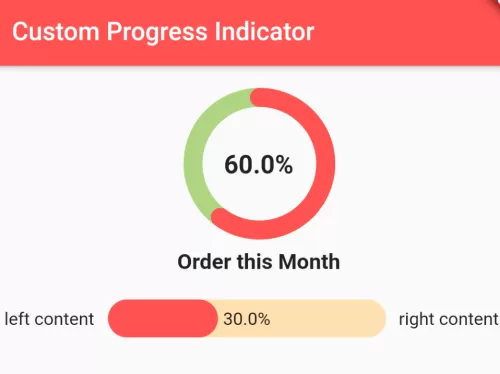
If you want to build a progress bar indicator that is either circular or linear different than the default progress bar indicator which looks more beautiful then see the example below. In this example, We have used the flutter package which helps to make this very easy. And we can easily apply the percentage on it and the progress text.

For this custom progress bar indicator, you need to add percent_indicator flutter package in your dependency by adding the following line in pubspec.yaml file.
dependencies:
  flutter:
    sdk: flutter
  percent_indicator: ^2.1.3
Circular Progress Bar Indicator with percentage basic code:
CircularPercentIndicator(
   radius: 60.0,
   lineWidth: 5.0,
   percent: 0.8,
   center: new Text("80%"),
   progressColor: Colors.green,
)
Liner Progress Bar Indicator with percentage basic code:
LinearPercentIndicator(
   width: 140.0,
   lineHeight: 14.0,
   percent: 0.5,
   backgroundColor: Colors.grey,
   progressColor: Colors.blue,
),
Full Flutter dart code:
import 'package:flutter/material.dart';
import 'package:flutter/widgets.dart';
import 'package:percent_indicator/percent_indicator.dart';

class MyProgressIndicator extends StatelessWidget{
  @override
  Widget build(BuildContext context) {
     return Scaffold(
        appBar: AppBar(
          title:Text("Custom Progress Indicator"),
          backgroundColor: Colors.redAccent
        ),
        body:Container(
            child:Column(
              children: <Widget>[
                  Container(
                     padding: EdgeInsets.all(10),
                     child: CircularPercentIndicator( //circular progress indicator
                      radius: 120.0, //radius for circle
                      lineWidth: 15.0, //width of circle line
                      animation: true, //animate when it shows progress indicator first
                      percent: 60/100, //vercentage value: 0.6 for 60% (60/100 = 0.6)
                      center: Text("60.0%",style: TextStyle(
                        fontWeight: FontWeight.bold, fontSize: 20.0),
                      ), //center text, you can set Icon as well
                      footer: Text("Order this Month", style:TextStyle(
                        fontWeight: FontWeight.bold, fontSize: 17.0),
                      ), //footer text
                      backgroundColor: Colors.lightGreen[300], //backround of progress bar
                      circularStrokeCap: CircularStrokeCap.round, //corner shape of progress bar at start/end
                      progressColor: Colors.redAccent, //progress bar color
                    )
                  ),

                  Container(
                     padding: EdgeInsets.all(10),
                     child: LinearPercentIndicator( //leaner progress bar
                        width: 210, //width for progress bar
                        animation: true, //animation to show progress at first
                        animationDuration: 1000,
                        lineHeight: 30.0, //height of progress bar
                        leading: Padding( //prefix content
                           padding: EdgeInsets.only(right:15),
                           child:Text("left content"), //left content
                        ),
                        trailing: Padding( //sufix content
                          padding: EdgeInsets.only(left:15),
                          child:Text("right content"), //right content
                        ),
                        percent: 0.3, // 30/100 = 0.3
                        center: Text("30.0%"),
                        linearStrokeCap: LinearStrokeCap.roundAll, //make round cap at start and end both
                        progressColor: Colors.redAccent, //percentage progress bar color
                        backgroundColor: Colors.orange[100],  //background progressbar color
                      ),
                  )
              ],
            )
        )
     );
  }

}
In this way, you can create a beautiful custom Circular or linear progress bar with the percentage. For other continuous measurement and value indicator widgets, explore adding range sliders in Flutter and animating progress using running code after a time delay.
Updated Flutter Example
Material 3 Determinate & Indeterminate Progress Indicators
Key Implementation Details & Modern Differences:
- Determinate Percentage Clamping: Feeds normalized
0.0 .. 1.0progress values into bothLinearProgressIndicatorandCircularProgressIndicatorwith interactive increment controls. - Modern Stroke Geometry: Applies
strokeCap: StrokeCap.roundand customstrokeWidthfor refined Material 3 aesthetic curves. - Dual Mode Architecture: Supports both indeterminate animated loading states and explicit determinate percentage displays within a single clean widget hierarchy.
import 'package:flutter/material.dart';

void main() {
  runApp(const MaterialApp(home: ModernProgressIndicatorsDemo()));
}

class ModernProgressIndicatorsDemo extends StatefulWidget {
  const ModernProgressIndicatorsDemo({super.key});

  @override
  State<ModernProgressIndicatorsDemo> createState() =>
      _ModernProgressIndicatorsDemoState();
}

class _ModernProgressIndicatorsDemoState
    extends State<ModernProgressIndicatorsDemo> {
  double _progress = 0.65; // 65% determinate progress

  void _adjustProgress(double delta) {
    setState(() {
      _progress = (_progress + delta).clamp(0.0, 1.0);
    });
  }

  @override
  Widget build(BuildContext context) {
    final percentText = '${(_progress * 100).toInt()}%';

    return Scaffold(
      appBar: AppBar(title: const Text('Material 3 Progress Indicators')),
      body: Padding(
        padding: const EdgeInsets.all(24.0),
        child: Column(
          crossAxisAlignment: CrossAxisAlignment.center,
          children: [
            Card(
              child: Padding(
                padding: const EdgeInsets.all(20.0),
                child: Column(
                  children: [
                    Text(
                      'Download Progress: $percentText',
                      key: const Key('progress-label'),
                      style: Theme.of(context).textTheme.titleMedium
                          ?.copyWith(fontWeight: FontWeight.bold),
                    ),
                    const SizedBox(height: 20),
                    // Linear indicator with rounded corners
                    ClipRRect(
                      borderRadius: BorderRadius.circular(8),
                      child: LinearProgressIndicator(
                        value: _progress,
                        minHeight: 10,
                      ),
                    ),
                    const SizedBox(height: 24),
                    // Circular indicator with matching progress
                    SizedBox(
                      height: 60,
                      width: 60,
                      child: CircularProgressIndicator(
                        value: _progress,
                        strokeWidth: 6,
                        strokeCap: StrokeCap.round,
                      ),
                    ),
                  ],
                ),
              ),
            ),
            const SizedBox(height: 24),
            Row(
              mainAxisAlignment: MainAxisAlignment.center,
              children: [
                FilledButton.tonal(
                  onPressed: () => _adjustProgress(-0.1),
                  child: const Text('-10%'),
                ),
                const SizedBox(width: 16),
                FilledButton(
                  onPressed: () => _adjustProgress(0.1),
                  child: const Text('+10%'),
                ),
              ],
            ),
          ],
        ),
      ),
    );
  }
}
Document History & Archival Record
Original reference snapshot archived March 22, 2023. Updated working solution verified on modern Flutter & Dart SDKs.