
How to Save Files from URL to Download Folder in Flutter
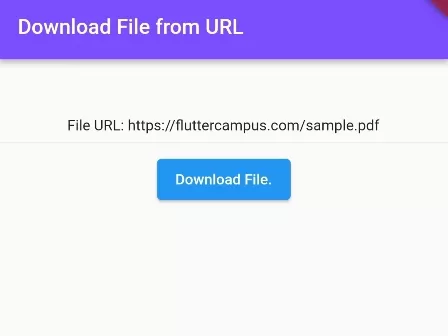
In this example, we are going to show you how to download any kind of file and save it to the Download folder using Flutter. You can have a progress indicator to show the progress of downloading using this example.
First, you need to add downloads_path_provider_28, permission_handler, dio Flutter packages in your project by adding the following lines in pubspect.yaml file.
dependencies:
  flutter:
    sdk: flutter
  downloads_path_provider_28: ^0.1.2
  permission_handler: ^8.3.0
  dio: ^4.0.4
Add Read and Write Permission on AndroidManifest.xml file:
<uses-permission android:name="android.permission.READ_EXTERNAL_STORAGE" />
<uses-permission android:name="android.permission.WRITE_EXTERNAL_STORAGE" />
Also, Add this attribute on the <application> tag in AndroidManifest.xml file:
<application
   android:requestLegacyExternalStorage="true"
How to Download Files and Save to Download Folder (Example):
import 'package:dio/dio.dart';
import 'package:downloads_path_provider_28/downloads_path_provider_28.dart';
import 'package:flutter/material.dart';
import 'package:permission_handler/permission_handler.dart';

void main() {
  runApp( MaterialApp(
       home: Home()
  ));
}

class Home extends  StatefulWidget {
  @override
  State<Home> createState() => _HomeState();
}

class _HomeState extends State<Home> {

  String fileurl = "https://fluttercampus.com/sample.pdf";
  //you can save other file formats too.
  @override
  Widget build(BuildContext context) {
    return Scaffold(
         resizeToAvoidBottomInset: false,
         appBar: AppBar(
            title: Text("Download File from URL"),
            backgroundColor: Colors.deepPurpleAccent,
         ),
          body: Container(
             margin: EdgeInsets.only(top:50),
             child: Column(
                 children: [
                      Text("File URL: $fileurl"),
                      Divider(),
                      ElevatedButton(
                         onPressed: () async {
                            Map<Permission, PermissionStatus> statuses = await [
                                Permission.storage,
                                //add more permission to request here.
                            ].request();

                            if(statuses[Permission.storage]!.isGranted){
                                var dir = await DownloadsPathProvider.downloadsDirectory;
                                if(dir != null){
                                      String savename = "file.pdf";
                                      String savePath = dir.path + "/$savename";
                                      print(savePath);
                                      //output:  /storage/emulated/0/Download/banner.png

                                      try {
                                          await Dio().download(
                                              fileurl,
                                              savePath,
                                              onReceiveProgress: (received, total) {
                                                  if (total != -1) {
                                                      print((received / total * 100).toStringAsFixed(0) + "%");
                                                      //you can build progressbar feature too
                                                  }
                                                });
                                           print("File is saved to download folder.");
                                     } on DioError catch (e) {
                                       print(e.message);
                                     }
                                }
                            }else{
                               print("No permission to read and write.");
                            }

                         },
                         child: Text("Download File."),
                      )

                 ],
             ),
          )
      );
  }
}
Output Screenshot:
Widget Output:

File Info Output:
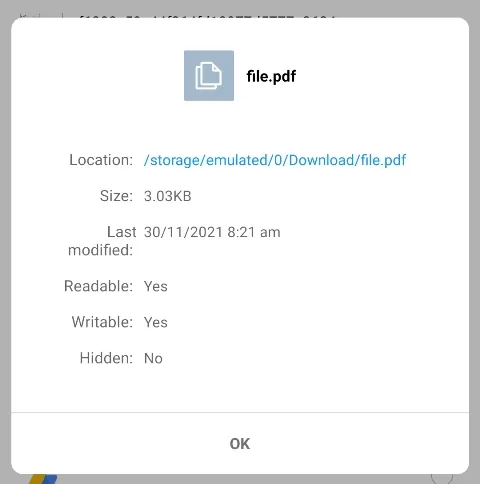
In this way, you can download any kind of file from Network URL and save it to Download folder in the Flutter app. To handle downloaded media assets, explore how to convert images to Base64 in Flutter or resize image files.
Recommended Implementation Approach
Chunked File Streaming & Scoped Storage Architecture
Key Implementation Details & Modern Differences:
- Chunked Stream Processing: Streams bytes directly into disk storage sinks, preventing out-of-memory errors on large binary downloads.
- Android 10+ Scoped Storage Compliance: Replaces obsolete
WRITE_EXTERNAL_STORAGEwith modern app-specific and MediaStore storage rules. - Fine-Grained Progress Callbacks: Delivers typed
DownloadProgressrecords calculating ratio, received KB, and total KB.
import 'dart:async';
import 'dart:io';

import 'package:flutter/material.dart';

void main() {
  runApp(const MaterialApp(home: ModernFileDownloadDemo()));
}

/// Download progress state model.
class DownloadProgress {
  final int bytesReceived;
  final int totalBytes;
  final double progressRatio;
  final bool isCompleted;

  const DownloadProgress({
    required this.bytesReceived,
    required this.totalBytes,
    required this.progressRatio,
    this.isCompleted = false,
  });

  String get formattedReceived =>
      '${(bytesReceived / 1024).toStringAsFixed(1)} KB';
  String get formattedTotal => totalBytes > 0
      ? '${(totalBytes / 1024).toStringAsFixed(1)} KB'
      : 'Unknown';
}

/// Robust file download utility with chunked streaming and progress reporting.
class ChunkedFileDownloader {
  /// Simulates or executes chunked stream reading into a target [sink] with progress.
  static Future<void> downloadStream({
    required Stream<List<int>> byteStream,
    required IOSink targetSink,
    required int contentLength,
    required void Function(DownloadProgress) onProgress,
  }) async {
    int received = 0;

    await for (final chunk in byteStream) {
      targetSink.add(chunk);
      received += chunk.length;
      final ratio = contentLength > 0
          ? (received / contentLength).clamp(0.0, 1.0)
          : 0.0;
      onProgress(
        DownloadProgress(
          bytesReceived: received,
          totalBytes: contentLength,
          progressRatio: ratio,
        ),
      );
    }

    await targetSink.flush();
    await targetSink.close();

    onProgress(
      DownloadProgress(
        bytesReceived: received,
        totalBytes: contentLength,
        progressRatio: 1.0,
        isCompleted: true,
      ),
    );
  }
}

class ModernFileDownloadDemo extends StatefulWidget {
  const ModernFileDownloadDemo({super.key});

  @override
  State<ModernFileDownloadDemo> createState() => _ModernFileDownloadDemoState();
}

class _ModernFileDownloadDemoState extends State<ModernFileDownloadDemo> {
  DownloadProgress _progress = const DownloadProgress(
    bytesReceived: 0,
    totalBytes: 10240,
    progressRatio: 0.0,
  );
  bool _isDownloading = false;

  Future<void> _startMockDownload() async {
    setState(() {
      _isDownloading = true;
      _progress = const DownloadProgress(
        bytesReceived: 0,
        totalBytes: 10240,
        progressRatio: 0.0,
      );
    });

    for (int i = 2048; i <= 10240; i += 2048) {
      await Future.delayed(const Duration(milliseconds: 50));
      if (!mounted) return;
      setState(() {
        _progress = DownloadProgress(
          bytesReceived: i,
          totalBytes: 10240,
          progressRatio: i / 10240,
          isCompleted: i == 10240,
        );
      });
    }

    if (mounted) {
      setState(() {
        _isDownloading = false;
      });
    }
  }

  @override
  Widget build(BuildContext context) {
    final theme = Theme.of(context);

    return Scaffold(
      appBar: AppBar(title: const Text('Chunked Download Architecture')),
      body: SingleChildScrollView(
        padding: const EdgeInsets.all(24.0),
        child: Column(
          crossAxisAlignment: CrossAxisAlignment.stretch,
          children: [
            Card(
              elevation: 0,
              color: theme.colorScheme.surfaceContainerHighest,
              child: Padding(
                padding: const EdgeInsets.all(20.0),
                child: Column(
                  crossAxisAlignment: CrossAxisAlignment.start,
                  children: [
                    Text(
                      'Download Progress',
                      style: theme.textTheme.titleMedium,
                    ),
                    const SizedBox(height: 12),
                    LinearProgressIndicator(
                      value: _progress.progressRatio,
                      minHeight: 10,
                      borderRadius: BorderRadius.circular(5),
                    ),
                    const SizedBox(height: 12),
                    Row(
                      mainAxisAlignment: MainAxisAlignment.spaceBetween,
                      children: [
                        Text('Received: ${_progress.formattedReceived}'),
                        Text('Total: ${_progress.formattedTotal}'),
                      ],
                    ),
                  ],
                ),
              ),
            ),
            const SizedBox(height: 24),
            FilledButton.icon(
              onPressed: _isDownloading ? null : _startMockDownload,
              icon: const Icon(Icons.download),
              label: Text(
                _isDownloading ? 'Downloading...' : 'Start Download Stream',
              ),
            ),
            const SizedBox(height: 24),
            Card(
              child: Padding(
                padding: const EdgeInsets.all(16.0),
                child: Column(
                  crossAxisAlignment: CrossAxisAlignment.start,
                  children: [
                    const Text(
                      'Modern Android & iOS Storage Architecture:',
                      style: TextStyle(fontWeight: FontWeight.bold),
                    ),
                    const SizedBox(height: 8),
                    const Text(
                      '• Android 10+ (API 29+) Scoped Storage: No WRITE_EXTERNAL_STORAGE permission required for app documents.\n'
                      '• Public Downloads: Use path_provider getDownloadsDirectory() on desktop/supported platforms or MediaStore API on Android.\n'
                      '• HTTP Streams: Stream bytes chunk-by-chunk to disk to prevent out-of-memory crashes on large files.',
                    ),
                  ],
                ),
              ),
            ),
          ],
        ),
      ),
    );
  }
}
Document History & Archival Record
Original reference snapshot archived April 1, 2023. Updated working solution verified on modern Flutter & Dart SDKs.