
How to Format Date and Time in Dart/Flutter
Verified Solution
Tested on Flutter 3.47.7 (Stable) • Dart 3.13.5
Jump to Updated Flutter Example ↓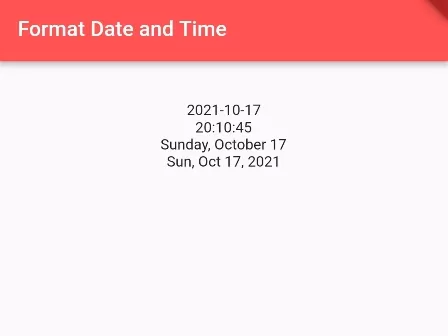
In this example, we are going to show you the easiest way to format date time in your desired pattern. You can format date and time in different combinations mixed with year, day, weekday, month, month name, hour, minute, second, and many more.
First, add, intl Flutter package in your project by adding the following lines in pubspec.yaml file.
dependencies:
  flutter:
    sdk: flutter
  intl: ^0.17.0
How to get the current date and time:
DateTime datetime = DateTime.now();
print(datetime.toString());
//output: 2023-01-16 20:04:17.118089
How to format date and time using the intl Flutter package.
DateTime datetime = DateTime.now();
print(datetime.toString());
//output: 2023-01-16 20:04:17.118089

String datetime1 = DateFormat("yyyy-MM-dd").format(datetime);
print(datetime1);
//output: 2023-01-16

String datetime2 = DateFormat.Hms().format(datetime);
print(datetime2);
//output (Time): 20:04:17

String datetime3 = DateFormat.MMMMEEEEd().format(datetime);
print(datetime3);
//output: Sunday, October 16
DateFormat() is from intl package.
How to get Year, Month, Day, Month, Second from DateTime():
DateTime datetime = DateTime.now();
print(datetime.toString());
//output: 2021-10-17 20:04:17.118089

String year = datetime.year.toString();
print(year); //output: 2021

String month = datetime.month.toString();
print(month); //Output: 10

String hour = datetime.hour.toString();
print(hour); //output (24 hour format): 20

String minute = datetime.minute.toString();
print(minute);

String second = datetime.second.toString();
print(second);
More Date and Time Formatting options:
ICU Name                   Skeleton
--------                   --------
DAY                          d
ABBR_WEEKDAY                 E
WEEKDAY                      EEEE
ABBR_STANDALONE_MONTH        LLL
STANDALONE_MONTH             LLLL
NUM_MONTH                    M
NUM_MONTH_DAY                Md
NUM_MONTH_WEEKDAY_DAY        MEd
ABBR_MONTH                   MMM
ABBR_MONTH_DAY               MMMd
ABBR_MONTH_WEEKDAY_DAY       MMMEd
MONTH                        MMMM
MONTH_DAY                    MMMMd
MONTH_WEEKDAY_DAY            MMMMEEEEd
ABBR_QUARTER                 QQQ
QUARTER                      QQQQ
YEAR                         y
YEAR_NUM_MONTH               yM
YEAR_NUM_MONTH_DAY           yMd
YEAR_NUM_MONTH_WEEKDAY_DAY   yMEd
YEAR_ABBR_MONTH              yMMM
YEAR_ABBR_MONTH_DAY          yMMMd
YEAR_ABBR_MONTH_WEEKDAY_DAY  yMMMEd
YEAR_MONTH                   yMMMM
YEAR_MONTH_DAY               yMMMMd
YEAR_MONTH_WEEKDAY_DAY       yMMMMEEEEd
YEAR_ABBR_QUARTER            yQQQ
YEAR_QUARTER                 yQQQQ
HOUR24                       H
HOUR24_MINUTE                Hm
HOUR24_MINUTE_SECOND         Hms
HOUR                         j
HOUR_MINUTE                  jm
HOUR_MINUTE_SECOND           jms
HOUR_MINUTE_GENERIC_TZ       jmv
HOUR_MINUTE_TZ               jmz
HOUR_GENERIC_TZ              jv
HOUR_TZ                      jz
MINUTE                       m
MINUTE_SECOND                ms
SECOND                       s
Flutter Code Example:
import 'package:flutter/material.dart';
import 'package:intl/intl.dart';

void main() {
  runApp(
    MaterialApp(
      home: MyApp()
    )
  );
}

class MyApp extends StatefulWidget{
  @override
  State<MyApp> createState() => _MyAppState();
}

class _MyAppState extends State<MyApp> {

  @override
  Widget build(BuildContext context) {

    DateTime datetime = DateTime.now();
    print(datetime.toString());
    //output: 2021-10-17 20:04:17.118089

    String datetime1 = DateFormat("yyyy-MM-dd").format(datetime);
    print(datetime1);
    //output: 2021-10-17

    String datetime2 = DateFormat.Hms().format(datetime);
    print(datetime2);
    //output (Time): 20:04:17

    String datetime3 = DateFormat.MMMMEEEEd().format(datetime);
    print(datetime3);
    //output: Sunday, October 17


    String datetime4 = DateFormat(DateFormat.YEAR_ABBR_MONTH_WEEKDAY_DAY).format(datetime);
    print(datetime4);
    //output: Sun, Oct 17, 2021

    String year = datetime.year.toString();
    print(year); //output: 2021

    String month = datetime.month.toString();
    print(month); //Output: 10

    String hour = datetime.hour.toString();
    print(hour); //output (24 hour format): 20

    String minute = datetime.minute.toString();
    print(minute);

    String second = datetime.second.toString();
    print(second);

    return Scaffold(
          appBar: AppBar(
              title:Text("Format Date and Time"), //appbar title
              backgroundColor: Colors.redAccent //appbar background color
          ),
          body: Container(
            alignment:Alignment.topCenter,
            padding: EdgeInsets.all(35),
             child: Column(
                children:[

                  Text(datetime1),

                  Text(datetime2),

                  Text(datetime3),

                  Text(datetime4),
                ]
             )
          )
      );
  }
}
Screenshot Output:

In this way, you can format the date and time in Dart and Flutter. To capture active timestamps before formatting, learn how to get the current date and time or compare two DateTime instances.
Updated Flutter Example
Updated Flutter Example
Custom DateTime Formatting & Pad Formatting
Key Implementation Details & Modern Differences:
- Zero-Dependency Formatting: Implements clean, robust YYYY-MM-DD and time formatting using standard Dart string interpolation.
- 12h & 24h Dual Support: Easily toggles between military 24-hour representation and standard 12-hour AM/PM conventions.
- Deterministic Zero-Padding: Utilizes
padLeft(2, '0')to prevent single-digit date and time alignment bugs.
Updated Flutter Example Code
import 'package:flutter/material.dart';

void main() {
  runApp(const MaterialApp(home: ModernDateTimeFormatDemo()));
}

/// Zero-dependency custom DateTime formatting service in pure Dart.
class ModernDateTimeFormatter {
  /// Formats date as 'YYYY-MM-DD'.
  static String formatDate(DateTime dt) {
    final y = dt.year.toString().padLeft(4, '0');
    final m = dt.month.toString().padLeft(2, '0');
    final d = dt.day.toString().padLeft(2, '0');
    return '$y-$m-$d';
  }

  /// Formats time as 'HH:mm:ss' (24-hour) or 'hh:mm:ss a' (12-hour AM/PM).
  static String formatTime(DateTime dt, {bool is24Hour = false}) {
    final min = dt.minute.toString().padLeft(2, '0');
    final sec = dt.second.toString().padLeft(2, '0');

    if (is24Hour) {
      final h = dt.hour.toString().padLeft(2, '0');
      return '$h:$min:$sec';
    } else {
      final period = dt.hour >= 12 ? 'PM' : 'AM';
      final hour12 = dt.hour % 12 == 0 ? 12 : dt.hour % 12;
      final h = hour12.toString().padLeft(2, '0');
      return '$h:$min:$sec $period';
    }
  }

  /// Formats complete timestamp 'YYYY-MM-DD HH:mm:ss'.
  static String formatFull(DateTime dt, {bool is24Hour = false}) {
    return '${formatDate(dt)} ${formatTime(dt, is24Hour: is24Hour)}';
  }
}

class ModernDateTimeFormatDemo extends StatefulWidget {
  const ModernDateTimeFormatDemo({super.key});

  @override
  State<ModernDateTimeFormatDemo> createState() =>
      _ModernDateTimeFormatDemoState();
}

class _ModernDateTimeFormatDemoState extends State<ModernDateTimeFormatDemo> {
  DateTime _sampleTime = DateTime(2026, 10, 17, 15, 30, 45);
  bool _is24Hour = false;

  @override
  Widget build(BuildContext context) {
    final theme = Theme.of(context);

    return Scaffold(
      appBar: AppBar(title: const Text('Custom DateTime Formatting')),
      body: SingleChildScrollView(
        padding: const EdgeInsets.all(20.0),
        child: Column(
          crossAxisAlignment: CrossAxisAlignment.stretch,
          children: [
            Card(
              elevation: 0,
              color: theme.colorScheme.surfaceContainerHighest,
              shape: RoundedRectangleBorder(
                borderRadius: BorderRadius.circular(16),
              ),
              child: Padding(
                padding: const EdgeInsets.all(20.0),
                child: Column(
                  children: [
                    Text(
                      'FORMATTED OUTPUT',
                      style: theme.textTheme.labelMedium?.copyWith(
                        color: theme.colorScheme.primary,
                        fontWeight: FontWeight.bold,
                      ),
                    ),
                    const SizedBox(height: 8),
                    Text(
                      ModernDateTimeFormatter.formatFull(
                        _sampleTime,
                        is24Hour: _is24Hour,
                      ),
                      key: const Key('formatted-time-output'),
                      style: theme.textTheme.headlineSmall?.copyWith(
                        fontWeight: FontWeight.bold,
                      ),
                    ),
                    const SizedBox(height: 8),
                    Text(
                      'Date: ${ModernDateTimeFormatter.formatDate(_sampleTime)}',
                      style: theme.textTheme.bodyMedium,
                    ),
                  ],
                ),
              ),
            ),
            const SizedBox(height: 24),
            Row(
              children: [
                Expanded(
                  child: Text(
                    'Time Format: ${_is24Hour ? "24-Hour" : "12-Hour (AM/PM)"}',
                    style: theme.textTheme.bodyMedium,
                  ),
                ),
                Switch(
                  value: _is24Hour,
                  onChanged: (val) => setState(() => _is24Hour = val),
                ),
              ],
            ),
            const SizedBox(height: 16),
            FilledButton.tonal(
              onPressed: () {
                setState(() {
                  _sampleTime = DateTime.now();
                });
              },
              child: const Text('Set to Current Time'),
            ),
          ],
        ),
      ),
    );
  }
}
Document History & Archival Record
Original reference snapshot archived February 3, 2023. Updated working solution verified on modern Flutter & Dart SDKs.