
How to Validate TextField and TextFormField Values in Flutter Form
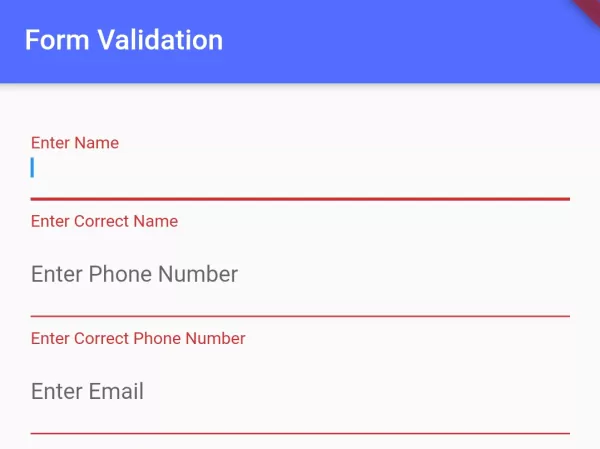
In this example, we are going to show you the easiest way to validate TextFiled or TextFormField in Flutter App. Validation is very important to retrieve correct data from users. See the example below to validate email, full name, phone number, credit card number, URL, and many more.
To validate the correctness of data, you can use Regular Expression (Regex) with the pattern.
Dart Regex Pattern to Check Full Name:
RegExp(r'^[a-z A-Z]+$')This pattern allows upper/lower case alphabets and space.
Dart Regex Pattern to Check Email Address:
RegExp(r'^[\w-\.]+@([\w-]+\.)+[\w-]{2,4}$')This regex checks email with domain extension length. Allows 2 to 4 domain extension lengths. For example, .com has 3 characters, .np as 2 characters, .store as 4 characters.
Dart Regex Pattern to Check Phone Number:
RegExp(r'^[+]*[(]{0,1}[0-9]{1,4}[)]{0,1}[-\s\./0-9]*$')This pattern allows “+” single sign at first.
ValidateLength of TextField Values:
if(fname.text.length > 10){
    //length of textfield with controller "name" has more than 10 characters.
}
Full Dart Code Example to Validate TextFields in Flutter:
import 'package:flutter/material.dart';

void main(){
  runApp(MyApp());
}

class MyApp extends StatelessWidget{
  @override
  Widget build(BuildContext context) {
    return MaterialApp(
      home: Home(),
    );
  }
}

class Home extends StatefulWidget{
  @override
  _HomeState createState() => _HomeState();
}

class _HomeState extends State<Home> {
  final formKey = GlobalKey<FormState>(); //key for form

  @override
  Widget build(BuildContext context) {
    return  Scaffold(
          appBar: AppBar(
             title: Text("Form Validation"),
             backgroundColor: Colors.indigoAccent,
          ),
          body: Container(
            padding: EdgeInsets.all(20),
            child: Form(
              key: formKey, //key for form
              child:Column(children: [

                     TextFormField(
                        decoration: InputDecoration(
                          labelText: 'Enter Name'
                        ),
                        validator: (value){
                          if(value.isEmpty || !RegExp(r'^[a-z A-Z]+$').hasMatch(value)){
                              //allow upper and lower case alphabets and space
                              return "Enter Correct Name";
                          }else{
                             return null;
                          }
                        },
                     ),

                     TextFormField(
                       decoration: InputDecoration(
                          labelText: 'Enter Phone Number'
                        ),
                        validator: (value){
                          if(value.isEmpty || !RegExp(r'^[+]*[(]{0,1}[0-9]{1,4}[)]{0,1}[-\s\./0-9]*$').hasMatch(value)){
                              //  r'^[0-9]{10}$' pattern plain match number with length 10
                              return "Enter Correct Phone Number";
                          }else{
                             return null;
                          }
                        },
                     ),

                     TextFormField(
                        decoration: InputDecoration(
                          labelText: 'Enter Email'
                        ),
                        validator: (value){
                          if(value.isEmpty || !RegExp(r'^[\w-\.]+@([\w-]+\.)+[\w-]{2,4}$').hasMatch(value)){
                              return "Enter Correct Email Address";
                          }else{
                             return null;
                          }
                        },
                     ),

                     ElevatedButton(
                      onPressed: (){
                          if(formKey.currentState.validate()){
                             //check if form data are valid,
                             // your process task ahed if all data are valid
                          }
                      },
                      child: Text("Submit Data")
                    )

                ],
               ),
            ),
          )
       );
  }
}
Output Screenshot:

To Validate Individual TextField Widget data:
class Home extends StatefulWidget{
  @override
  _HomeState createState() => _HomeState();
}

class _HomeState extends State<Home> {
  TextEditingController fname = TextEditingController();
  bool texterror = false;

  @override
  void initState() {
    fname.text = "";
    super.initState();
  }

  @override
  Widget build(BuildContext context) {
    return  Scaffold(
          appBar: AppBar(
             title: Text("TextField Validation"),
             backgroundColor: Colors.indigoAccent,
          ),
          body: Container(
            padding: EdgeInsets.all(20),
            child: Column(children: [
                     TextField(
                       controller: fname,
                       decoration: InputDecoration(
                         labelText: "Your Name",
                         errorText: texterror?"Enter Correct Name":null,
                       )
                     ),

                     ElevatedButton(
                      onPressed: (){
                         if(fname.text.isEmpty || !RegExp(r'^[a-z A-Z]+$').hasMatch(fname.text)){
                              setState(() {
                                texterror = true;
                              });
                          }else{
                             setState(() {
                                texterror = false;
                              });
                          }
                      },
                      child: Text("Submit Data")
                    )

                ],
            )
          )
       );
  }
}
Furthermore, you can validate data easily without using Regex. For that, add validators flutter package to your dependency by adding the following line in pubspec.yaml file:
dependencies:
  flutter:
    sdk: flutter
  validators: ^3.0.0
Import package to Script:
import 'package:validators/validators.dart';Validate Email:
if(isEmail(value)){
  //value is email
}
Validate Web URL:
if(isURL(value)){
  //value is web URL link
}
Validate Alphabets in String:
if(isAlpha(value)){
  //value has alphabets only
}
Validate Credit Card Number:
if(isCreditCard(value)){
  //value is credit card number
}
Validate if Text is Date:
if(isCreditCard(value)){
  //value is credit card number
}
More Methods from package “validators”:
- contains – check if the string contains the seed.
- equals – check if the string matches the comparison.
- isAfter – check if the string is a date that’s after the specified date.
- isAlphanumeric – check if the string str contains only letters and numbers.
- isBefore – check if the string is a date that’s before the specified date.
- isFloat – check if the string str is a float.
- isFQDN – check if the string str is a fully qualified domain name (e.g. domain.com).
- isHexadecimal – check if the string stris a hexadecimal number.
- isHexColor – check if the string str is a hexadecimal color.
- isInt – check if the string str is an integer.
- isIP – check if the string str is IP version 4 or 6.
- isISBN – check if the string is an ISBN (version 10 or 13).
- isJSON – check if the string is valid JSON.
- isLength(String str, int min, [int? max]) – check if the length of the string str falls in a range.
- isLowercase – check if the string str is lowercase.
- isMongoId – check if the string is a valid hex-encoded representation of a MongoDB ObjectId.
- isNull – check if the string str is null.
- isNumeric – check if the string str contains only numbers.
- isPostalCode – Check if the string is postal or zip code.
- isUppercase – check if the string str is uppercase.
- isUUID – check if the string is a UUID (version 3, 4 or 5).
- matches – check if string str matches the Regex pattern.
In this way, you can validate TextFormFiled or TextField data with Dart Regex and package in Flutter App. To build complete form experiences, review how to set up TextField hints and styling and configure password input fields.
Updated Flutter Example
Modern Form & TextFormField Validation in Flutter 3.x
Key Implementation Details & Modern Differences:
- Sound Null Safety Signatures: The validator signature is
String? Function(String? value). Returningnullindicates a valid field; returning a non-empty string renders the error. - AutovalidateMode: Uses
AutovalidateMode.onUserInteractionfor immediate, responsive user feedback without requiring full form submission on first touch. - ScaffoldMessenger: Replaces deprecated
Scaffold.of(context).showSnackBar()with modernScaffoldMessenger.of(context).showSnackBar(). - Lifecycle Management: Controllers are explicitly cleaned up inside
dispose()to prevent memory leaks in production apps.
import 'package:flutter/material.dart';

void main() {
  runApp(const MaterialApp(home: ModernFormValidationDemo()));
}

class ModernFormValidationDemo extends StatefulWidget {
  const ModernFormValidationDemo({super.key});

  @override
  State<ModernFormValidationDemo> createState() =>
      _ModernFormValidationDemoState();
}

class _ModernFormValidationDemoState extends State<ModernFormValidationDemo> {
  final _formKey = GlobalKey<FormState>();
  final _emailController = TextEditingController();
  final _phoneController = TextEditingController();

  static final _emailRegex = RegExp(r'^[\w-\.]+@([\w-]+\.)+[\w-]{2,4}$');
  static final _phoneRegex = RegExp(
    r'^[+]*[(]{0,1}[0-9]{1,4}[)]{0,1}[-\s\./0-9]*$',
  );

  @override
  void dispose() {
    _emailController.dispose();
    _phoneController.dispose();
    super.dispose();
  }

  void _submitForm() {
    if (_formKey.currentState?.validate() ?? false) {
      ScaffoldMessenger.of(context).showSnackBar(
        const SnackBar(
          content: Text('Form submitted successfully!'),
          backgroundColor: Colors.green,
        ),
      );
    }
  }

  @override
  Widget build(BuildContext context) {
    return Scaffold(
      appBar: AppBar(title: const Text('Modern Form Validation')),
      body: Padding(
        padding: const EdgeInsets.all(20.0),
        child: Form(
          key: _formKey,
          autovalidateMode: AutovalidateMode.onUserInteraction,
          child: Column(
            crossAxisAlignment: CrossAxisAlignment.stretch,
            children: [
              TextFormField(
                controller: _emailController,
                keyboardType: TextInputType.emailAddress,
                decoration: const InputDecoration(
                  labelText: 'Email Address',
                  border: OutlineInputBorder(),
                  prefixIcon: Icon(Icons.email_outlined),
                ),
                validator: (value) {
                  if (value == null || value.trim().isEmpty) {
                    return 'Please enter your email';
                  }
                  if (!_emailRegex.hasMatch(value.trim())) {
                    return 'Enter a valid email address';
                  }
                  return null;
                },
              ),
              const SizedBox(height: 16),
              TextFormField(
                controller: _phoneController,
                keyboardType: TextInputType.phone,
                decoration: const InputDecoration(
                  labelText: 'Phone Number',
                  border: OutlineInputBorder(),
                  prefixIcon: Icon(Icons.phone_outlined),
                ),
                validator: (value) {
                  if (value == null || value.trim().isEmpty) {
                    return 'Please enter your phone number';
                  }
                  if (!_phoneRegex.hasMatch(value.trim())) {
                    return 'Enter a valid phone number';
                  }
                  return null;
                },
              ),
              const SizedBox(height: 24),
              FilledButton(
                onPressed: _submitForm,
                child: const Text('Submit Form'),
              ),
            ],
          ),
        ),
      ),
    );
  }
}Document History & Archival Record
Original reference snapshot archived February 3, 2023. Updated working solution verified on modern Flutter & Dart SDKs.