
How to add Border Radius on Card in Flutter
Verified Solution
Tested on Flutter 3.47.7 • Dart 3.13.5
Jump to Updated Flutter Example ↓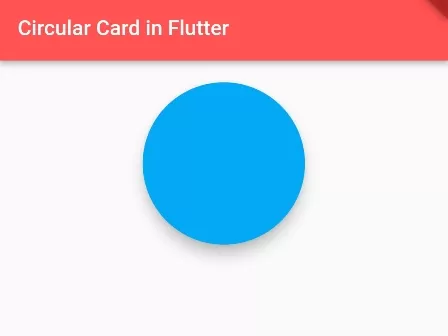
In this example, we are going to show you the easiest way to add border radius on the Card() widget in Flutter. Border radius is used to make Circle, you can add border radius more than 50% of width or height in Card to make it a circle.
How to Add Border Radius on Card:
Card(
  shape: RoundedRectangleBorder(
    borderRadius: BorderRadius.circular(80),
      //set border radius more than 50% of height and width to make circle
  )
)
How to Add Border Radius to Specific Side:
Card(
  shape: RoundedRectangleBorder(
      borderRadius: BorderRadius.only(topLeft: Radius.circular(10))
  ),
)
How to Make Card Circular:
SizedBox(
  height: 150, width:150,
  //square box; equal height and width so that it won't look like oval
  child:Card(
      shape: RoundedRectangleBorder(
          borderRadius: BorderRadius.circular(80),
          //set border radius more than 50% of height and width to make circle
      ),
    )
)
Full Code Example:
import 'package:flutter/material.dart';

void main() {
  runApp(
    MaterialApp(
      home: MyApp()
    )
  );
}

class MyApp extends StatelessWidget{
  @override
  Widget build(BuildContext context) {
    return Scaffold(
          appBar: AppBar(
              title:Text("Circular Card in Flutter"), //appbar title
              backgroundColor: Colors.redAccent //appbar background color
          ),
          body: Container(
            alignment:Alignment.topCenter,
            padding: EdgeInsets.all(15),
             child: SizedBox(
               height: 150, width:150,
               //square box; equal height and width so that it won't look like oval
               child:Card(
                   shape: RoundedRectangleBorder(
                       borderRadius: BorderRadius.circular(80),
                       //set border radius more than 50% of height and width to make circle
                   ),
                   color: Colors.lightBlue,
                   elevation:10,

                 )
             )
          )
      );
  }
}
Output Screenshot:

In this way, you can add a Border radius on the Card and make it circular in Flutter. For matching corner curvature across cards and buttons, explore border radius on circular ElevatedButtons and linear gradient backgrounds on containers.
Updated Flutter Example
Updated Flutter Example
Material 3 Card Variants & Custom Border Geometry
Key Implementation Details & Modern Differences:
- Material 3 Card Hierarchy: Showcases all three standard Material 3 Card variants: elevated
Card(),Card.outlined(), andCard.filled(). - Declarative Shape Styling: Applies
RoundedRectangleBorderwith customBorderRadius.circular()and theme-awareborderSideoutlines. - ClipBehavior Protection: Uses
clipBehavior: Clip.antiAliasto prevent child content from bleeding past curved card boundaries.
Updated Flutter Example Code
import 'package:flutter/material.dart';

void main() {
  runApp(const MaterialApp(home: ModernCardVariantsDemo()));
}

class ModernCardVariantsDemo extends StatelessWidget {
  const ModernCardVariantsDemo({super.key});

  @override
  Widget build(BuildContext context) {
    return Scaffold(
      appBar: AppBar(title: const Text('Material 3 Card Variants & Radius')),
      body: Padding(
        padding: const EdgeInsets.all(20.0),
        child: Column(
          children: [
            // Standard elevated Card with custom border radius
            Card(
              elevation: 2,
              shape: RoundedRectangleBorder(
                borderRadius: BorderRadius.circular(16),
              ),
              child: const ListTile(
                leading: Icon(Icons.style),
                title: Text('Elevated Card (Radius: 16)'),
                subtitle: Text('Default elevation surface elevation'),
              ),
            ),
            const SizedBox(height: 16),
            // Outlined Card
            Card.outlined(
              shape: RoundedRectangleBorder(
                borderRadius: BorderRadius.circular(20),
                side: BorderSide(
                  color: Theme.of(context).colorScheme.outlineVariant,
                ),
              ),
              child: const ListTile(
                leading: Icon(Icons.crop_square),
                title: Text('Outlined Card (Radius: 20)'),
                subtitle: Text('Clean flat border container'),
              ),
            ),
            const SizedBox(height: 16),
            // Filled Card
            Card.filled(
              shape: RoundedRectangleBorder(
                borderRadius: BorderRadius.circular(24),
              ),
              child: const ListTile(
                leading: Icon(Icons.layers),
                title: Text('Filled Card (Radius: 24)'),
                subtitle: Text('Semantic surfaceContainerHighest fill'),
              ),
            ),
          ],
        ),
      ),
    );
  }
}
Document History & Archival Record
Original reference snapshot archived February 2, 2023. Updated working solution verified on modern Flutter & Dart SDKs.