
How to Remove HTML tags from String in Flutter/Dart
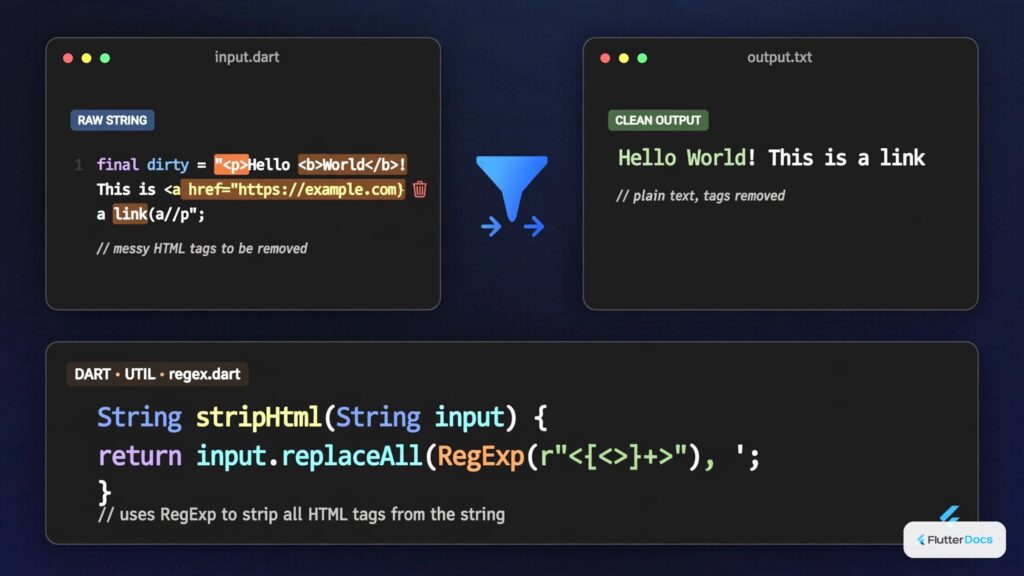
In this example, we are going to show you how to strip HTML tags from String in Dart/Flutter. Using the example below, you can convert any kind of HTML to String in Flutter.
See this also: How to Convert/Show HTML as Widget in Flutter
Strip HTML tags without Package
String html = '<div><p>Hello</p>This is <br/>fluttercampus.com<span>,Bye!</span></div>';

RegExp exp = RegExp(r"<[^>]*>",multiLine: true,caseSensitive: true);
String parsedstring1 = html.replaceAll(exp, '');
print(parsedstring1);
//output without space:  HelloThis is fluttercampus.com,Bye!

String parsedstring2 = html.replaceAll(exp, ' ');
print(parsedstring2);
//output with space:   Hello This is  fluttercampus.com ,Bye!
Here, we remove all HTML tags using Regex expression. You can also use RegExp(r'<[^>]*>|&[^;]+;')to strip HTML tags.
Strip HTML tags with html Package
Integrate html flutter package in your project by adding the following lines in your pubspec.yaml file.
dependencies:
  flutter:
    sdk: flutter
  html: ^0.15.0
Remove HTML tags:
import 'package:html/parser.dart';String html = '<div><p>Hello</p>This is <br/>fluttercampus.com<span>,Bye!</span></div>';
var doc = parse(html);
if(doc.documentElement != null){
String parsedstring = doc.documentElement!.text;
print(parsedstring);
//output without space: HelloThis is fluttercampus.com,Bye!
}Strip HTML tags with intl Package:
Install intl package on your project by adding following lines in pubspec.yaml file:
dependencies:
  flutter:
    sdk: flutter
  intl: ^0.17.0
Remove HTML tags:
import 'package:intl/intl.dart';String html = '<div><p>Hello</p>This is <br/>fluttercampus.com<span>,Bye!</span></div>';
//Bidi.stripThmlIfNeeded() method is from intl package
String parsedstring3 = Bidi.stripHtmlIfNeeded(html);
print(parsedstring3);
//output with space: Hello This is fluttercampus.com ,Bye!You can see the documentation of stripHtmlIfNeeded on this link. If you don’t want to use the whole package for this single method. you can declare the method anywhere and use it in your project. The method on the documentation is:
static String stripHtmlIfNeeded(String text) {
  // The regular expression is simplified for an HTML tag (opening or
  // closing) or an HTML escape. We might want to skip over such expressions
  // when estimating the text directionality.
  return text.replaceAll(RegExp(r'<[^>]*>|&[^;]+;'), ' ');
}
In this way, you can remove HTML tags from strings in Dart/Flutter. If you need to display formatted web markup instead of stripping tags, see how to convert and render HTML as widgets or configure WYSIWYG HTML editors in Flutter.
Updated Flutter Example
HTML Markup Stripping & Entity Decoding Architecture
Key Implementation Details & Modern Differences:
- Script/Style Block Removal: Strips entire
<script>and<style>bodies rather than leaving orphaned code. - Semantic Break Handling: Converts block tags (
<p>,<br>,<h1-h6>) to clean line breaks. - HTML Entity Decoding: Unescapes named entities (
&,©) and numeric hex/dec codes without external packages.
import 'package:flutter/material.dart';
void main() {
runApp(const MaterialApp(home: ModernHtmlStripperDemo()));
}
/// Production utility for stripping HTML markup, scripts, styles, and unescaping entities.
class HtmlStripper {
static final RegExp _scriptBlock = RegExp(
r'<script[^>]*>[\s\S]*?<\/script>',
caseSensitive: false,
);
static final RegExp _styleBlock = RegExp(
r'<style[^>]*>[\s\S]*?<\/style>',
caseSensitive: false,
);
static final RegExp _htmlTag = RegExp(r'<[^>]+>');
static final RegExp _multiWhitespace = RegExp(r'[ \t]+');
static final RegExp _multiNewline = RegExp(r'\n\s*\n');
/// Common HTML entity unescape table.
static final Map<String, String> _entities = {
' ': ' ',
'&': '&',
'<': '<',
'>': '>',
'"': '"',
''': "'",
''': "'",
'©': '©',
'®': '®',
'—': '—',
'–': '–',
};
/// Strips all HTML markup, script/style blocks, and converts HTML entities to plain text.
static String strip(String html) {
if (html.isEmpty) return '';
// 1. Remove dangerous or non-content blocks (scripts, styles)
var text = html.replaceAll(_scriptBlock, '');
text = text.replaceAll(_styleBlock, '');
// 2. Replace block breaks (<br>, </p>, </div>, </li>, </h1>..</h6>) with newlines
text = text.replaceAll(RegExp(r'<br\s*\/?>', caseSensitive: false), '\n');
text = text.replaceAll(
RegExp(r'<\/(p|div|li|h[1-6]|tr)>', caseSensitive: false),
'\n',
);
// 3. Remove all remaining tags
text = text.replaceAll(_htmlTag, '');
// 4. Unescape standard HTML entities
_entities.forEach((entity, replacement) {
text = text.replaceAll(entity, replacement);
});
// 5. Decode numeric entities (e.g. A or A)
text = text.replaceAllMapped(RegExp(r'&#(x?[0-9a-fA-F]+);'), (m) {
final codeStr = m.group(1)!;
try {
final code = codeStr.startsWith('x') || codeStr.startsWith('X')
? int.parse(codeStr.substring(1), radix: 16)
: int.parse(codeStr);
return String.fromCharCode(code);
} catch (_) {
return m.group(0)!;
}
});
// 6. Normalize whitespace
text = text.replaceAll(_multiWhitespace, ' ');
text = text.replaceAll(_multiNewline, '\n\n');
return text.trim();
}
}
class ModernHtmlStripperDemo extends StatefulWidget {
const ModernHtmlStripperDemo({super.key});
@override
State<ModernHtmlStripperDemo> createState() => _ModernHtmlStripperDemoState();
}
class _ModernHtmlStripperDemoState extends State<ModernHtmlStripperDemo> {
final TextEditingController _inputController = TextEditingController();
String _strippedText = '';
static const _sampleHtml =
'<h2>Flutter & Dart</h2>'
'<p>Learn how to <b>strip HTML tags</b> safely without heavy dependencies.</p>'
'<p>Visit <a href="https://flutterdocs.dev">FlutterDocs</a> © 2026.</p>';
@override
void initState() {
super.initState();
_inputController.text = _sampleHtml;
_strip();
}
@override
void dispose() {
_inputController.dispose();
super.dispose();
}
void _strip() {
setState(() {
_strippedText = HtmlStripper.strip(_inputController.text);
});
}
@override
Widget build(BuildContext context) {
final theme = Theme.of(context);
return Scaffold(
appBar: AppBar(title: const Text('HTML Stripper & Entity Decoder')),
body: SingleChildScrollView(
padding: const EdgeInsets.all(20.0),
child: Column(
crossAxisAlignment: CrossAxisAlignment.stretch,
children: [
Text('HTML Source Input:', style: theme.textTheme.titleMedium),
const SizedBox(height: 8),
TextField(
controller: _inputController,
maxLines: 5,
decoration: const InputDecoration(
border: OutlineInputBorder(),
hintText: 'Enter HTML snippet...',
),
onChanged: (_) => _strip(),
),
const SizedBox(height: 20),
Text('Plain Text Output:', style: theme.textTheme.titleMedium),
const SizedBox(height: 8),
Card(
elevation: 0,
color: theme.colorScheme.surfaceContainerHighest,
child: Padding(
padding: const EdgeInsets.all(16.0),
child: SelectableText(
_strippedText,
key: const Key('stripped-text-output'),
style: theme.textTheme.bodyLarge,
),
),
),
],
),
),
);
}
}
Document History & Archival Record
Original reference snapshot archived April 1, 2023. Updated working solution verified on modern Flutter & Dart SDKs.