
How to Read GET Query Parameters from URL in Flutter Web
Flutter Web is new and there are lots of difficulties while building simple functionality, the same way it is a bit difficult to grab URL attributes or parameters.\u00a0 \u00a0Anyway, we will show you how to grab parameters from URLs in Flutter web. See the example below:
To get Parameters from URL:
void main() {
  String myurl = Uri.base.toString(); //get complete url
  String para1 = Uri.base.queryParameters["para1"]; //get parameter with attribute "para1"
  String para2 = Uri.base.queryParameters["para2"]; //get parameter with attribute "para2"
}
See the example below to display these values in Scaffold() widget.
Full Dart Code:
import 'package:flutter/material.dart';

void main() {

  String myurl = Uri.base.toString(); //get complete url
  String para1 = Uri.base.queryParameters["para1"]; //get parameter with attribute "para1"
  String para2 = Uri.base.queryParameters["para2"]; //get parameter with attribute "para2"

  runApp(MyApp(myurl: myurl, para1: para1, para2:para2)); //pass to MyApp class
}

class MyApp extends StatefulWidget{

  String myurl, para1, para2;
  MyApp({this.myurl, this.para1, this.para2}); //constructor of MyApp class

  @override
  _MyAppState createState() => _MyAppState();
}

class _MyAppState extends State<MyApp> {
  @override
  Widget build(BuildContext context) {
    return MaterialApp(
        title: "Test App",
        home: Scaffold(
            appBar: AppBar(
              title: Text("Get URL Parameter"),
              backgroundColor: Colors.redAccent,
            ),

            body: Container(
              padding: EdgeInsets.all(20),
              alignment: Alignment.center,
              child: Column(
                children: [
                  //display parameters and URL here
                   Text(widget.para1 == null?"Parameter1 is null":"Parameter 1 = " + widget.para1),
                   Text(widget.para2 == null?"Parameter2 is null":"Parameter 2 = " + widget.para2),
                   Text(widget.myurl == null?"URl is null":"URL = " + widget.myurl)
                ],)
              )
        ),
    );
  }
}
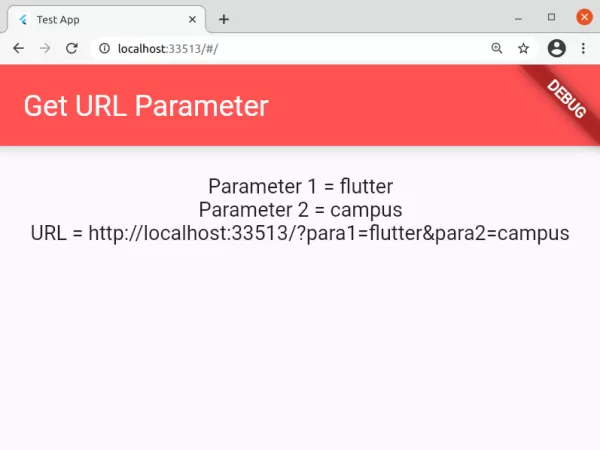
Now run this in web, and pass parameters with attributes “para1” and “para2” to see the output:
Output Screenshot:

Here, we had passed\u00a0http://localhost:33513/?para1=flutter¶2=campus URL, and we get the output above. You can try with your own parameters. This is the way you can read parameters from URLs in Flutter Web. For browser navigation and routing workflows, explore opening external links in Flutter Web and saving files from URLs in Flutter.
Updated Flutter Example
Universal URL Query Parameter Extraction in Flutter Web
Key Implementation Details & Modern Differences:
- Platform-Agnostic Web URI Resolution: Uses
Uri.base.queryParametersto inspect browser URL query strings without requiring heavy third-party routing packages or browser-specific JavaScript interop. - Null-Safe Fallback Defaults: Safely extracts required parameters with
?? 'default'fallbacks, preventing null pointer crashes on missing keys. - Testable Extraction Pattern: Exposes an injectable parameters map allowing widget tests to verify parsing behavior deterministically across all platforms.
import 'package:flutter/material.dart';

void main() {
  runApp(const MaterialApp(home: ModernQueryParamDemo()));
}

class ModernQueryParamDemo extends StatelessWidget {
  final Map<String, String>? initialParams;

  const ModernQueryParamDemo({super.key, this.initialParams});

  Map<String, String> _extractParameters() {
    // In production web runtimes: Uri.base.queryParameters provides query params
    if (initialParams != null) return initialParams!;
    return Uri.base.queryParameters;
  }

  @override
  Widget build(BuildContext context) {
    final params = _extractParameters();
    final user = params['user'] ?? 'Guest';
    final tab = params['tab'] ?? 'overview';

    return Scaffold(
      appBar: AppBar(title: const Text('URL Query Parameter Routing')),
      body: Padding(
        padding: const EdgeInsets.all(20.0),
        child: Column(
          crossAxisAlignment: CrossAxisAlignment.start,
          children: [
            Card(
              child: Padding(
                padding: const EdgeInsets.all(16.0),
                child: Column(
                  crossAxisAlignment: CrossAxisAlignment.start,
                  children: [
                    Text(
                      'Extracted URL Parameters',
                      style: Theme.of(context).textTheme.titleMedium,
                    ),
                    const SizedBox(height: 8),
                    Text('User: $user', key: const Key('user-param')),
                    Text('Active Tab: $tab', key: const Key('tab-param')),
                  ],
                ),
              ),
            ),
          ],
        ),
      ),
    );
  }
}
Document History & Archival Record
Original reference snapshot archived April 5, 2021. Updated working solution verified on modern Flutter & Dart SDKs.