
How to Make ʺDouble Press Back Button to Exitʺ in Flutter
Verified Solution
Tested on Flutter 3.47.7 • Dart 3.13.5
Jump to Updated Flutter Example ↓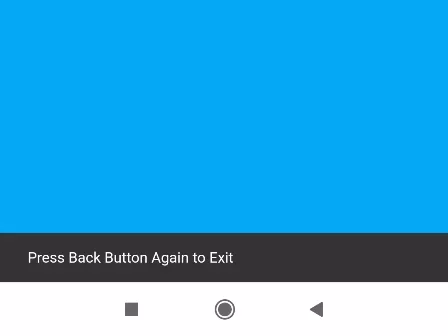
In this example, we are going to show you how to make double press the back button to exit the app on Flutter. We are not going to use any package to achieve this feature. See the example below:
See this also:\u00a0How to override Back Button and Show Exit Confirm in Flutter App
Double Back Button Press Exist App Example:
import 'package:flutter/material.dart';

void main() {
  runApp(MaterialApp(
      home: MyApp()
  ));
}

class MyApp extends StatefulWidget{
  @override
  State<MyApp> createState() => _MyAppState();
}

class _MyAppState extends State<MyApp> {

  var ctime;

  @override
  Widget build(BuildContext context) {
    return Scaffold(
          body: WillPopScope(

             onWillPop: () {
                DateTime now = DateTime.now();
                if (ctime == null || now.difference(ctime) > Duration(seconds: 2)) {
                     //add duration of press gap
                    ctime = now;
                    ScaffoldMessenger.of(context).showSnackBar(
                       SnackBar(content: Text('Press Back Button Again to Exit'))
                    ); //scaffold message, you can show Toast message too.
                    return Future.value(false);
                }

                return Future.value(true);
             },

             child: Container(
                color: Colors.lightBlue,
                //your content goes here.
             )
          )
      );
  }
}
Output on Back button Press:

In this way, you can add a Double back button press to exit feature on Flutter App. For an alternative exit pattern using confirmation alerts, see overriding the back button with a confirmation popup and displaying toast messages on back press.
Updated Flutter Example
Updated Flutter Example
Modern PopScope Exit Interception Architecture
Key Implementation Details & Modern Differences:
- PopScope Migration: Replaces completely deprecated
WillPopScope(deprecated in Flutter 3.12, removed from modern patterns) with Flutter's officialPopScopeandonPopInvokedWithResult. - Predictive Back Support: Respects Android 14+ predictive back gestures by declaring predictive navigation intention via dynamic
canPopboolean flags. - Micro-Confirmation Ergonomics: Displays an ephemeral Material 3
SnackBaron the initial gesture, allowing pop only when a second back event occurs within a 2-second time window.
Updated Flutter Example Code
import 'package:flutter/material.dart';

void main() {
  runApp(const MaterialApp(home: ModernDoubleBackExitDemo()));
}

class ModernDoubleBackExitDemo extends StatefulWidget {
  const ModernDoubleBackExitDemo({super.key});

  @override
  State<ModernDoubleBackExitDemo> createState() =>
      _ModernDoubleBackExitDemoState();
}

class _ModernDoubleBackExitDemoState extends State<ModernDoubleBackExitDemo> {
  DateTime? _lastBackPressed;
  bool _canPop = false;

  void _handlePopInvoked(bool didPop, dynamic result) {
    if (didPop) return;

    final now = DateTime.now();
    final backPressedRecently =
        _lastBackPressed != null &&
        now.difference(_lastBackPressed!) < const Duration(seconds: 2);

    if (backPressedRecently) {
      setState(() => _canPop = true);
      // Allow pop on subsequent invocation
      WidgetsBinding.instance.addPostFrameCallback((_) {
        if (mounted) {
          Navigator.of(context).maybePop(result);
        }
      });
    } else {
      _lastBackPressed = now;
      ScaffoldMessenger.of(context).showSnackBar(
        const SnackBar(
          content: Text('Press back again to exit'),
          duration: Duration(seconds: 2),
        ),
      );
    }
  }

  @override
  Widget build(BuildContext context) {
    return PopScope(
      canPop: _canPop,
      onPopInvokedWithResult: _handlePopInvoked,
      child: Scaffold(
        appBar: AppBar(title: const Text('Modern PopScope Exit Interception')),
        body: Center(
          child: Column(
            mainAxisAlignment: MainAxisAlignment.center,
            children: [
              const Icon(Icons.exit_to_app, size: 48, color: Colors.blueAccent),
              const SizedBox(height: 16),
              const Text(
                'Press device back button twice within 2 seconds to exit.',
                textAlign: TextAlign.center,
              ),
              const SizedBox(height: 20),
              FilledButton(
                onPressed: () => _handlePopInvoked(false, null),
                child: const Text('Simulate Back Navigation'),
              ),
            ],
          ),
        ),
      ),
    );
  }
}
Document History & Archival Record
Original reference snapshot archived February 3, 2023. Updated working solution verified on modern Flutter & Dart SDKs.